Live lighting for DJs, clubs, bands and tours. It follows every deck, remembers every song, and runs any rig, from one bar's pars to a festival's pixels.
Windows + macOSUnlimited universesNo hardware lockAny controllerTimecode built in
→ to begin · 1 2 3 the detail · G the index
00 The idea
Simple enough for a weekend DJ. Deep enough for a world tour.
For the DJ
Cues live on songs.
Program a song once. It lights itself every time it's played, by any DJ, on the bar it belongs to.
For the lighting designer
Looks, music, time.
A console that thinks the way a show is built: tap the fixtures, tap the look, it's on the timeline. No syntax to learn first.
For the venue
One PC runs it all.
Any fixtures, any controller, unlimited Art-Net and sACN universes. No dongles, no output boxes to buy.
Built by a lighting director who spent twenty years programming the biggest consoles, then wrote the scripts that made them do what lighting should do by itself. cue/ctrl is what those scripts wanted to be.
00 The screen
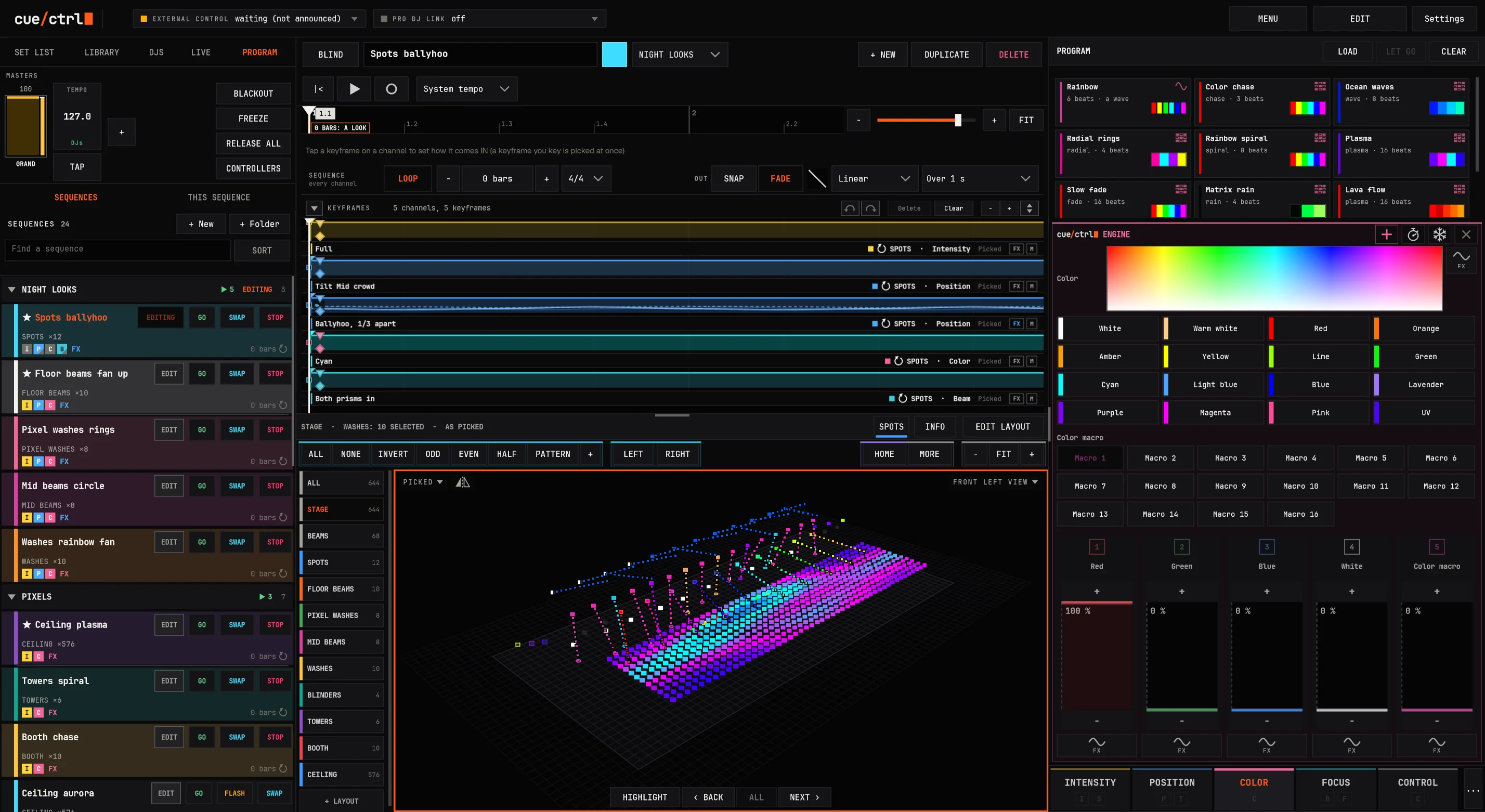
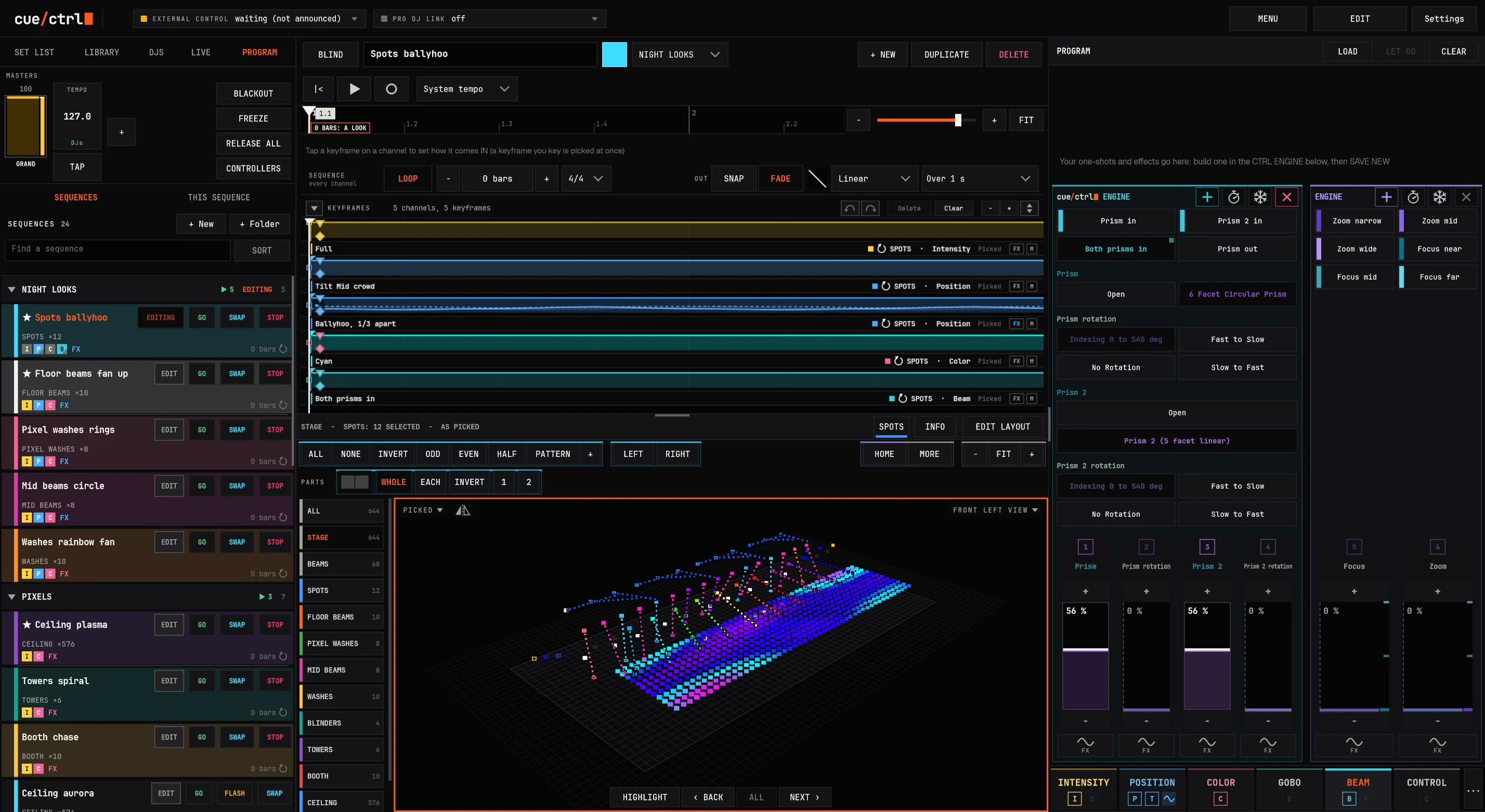
One screen. The whole show.
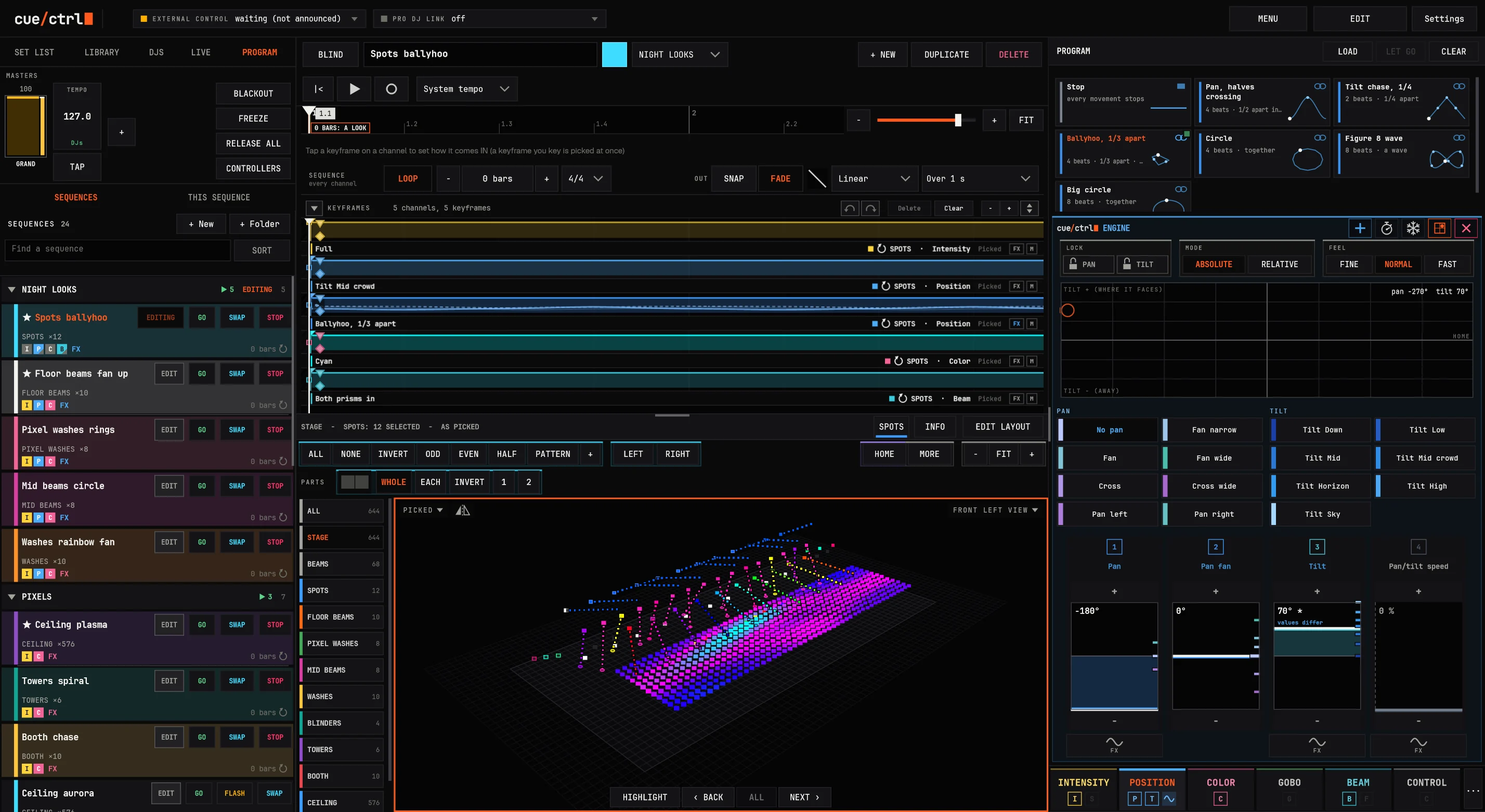
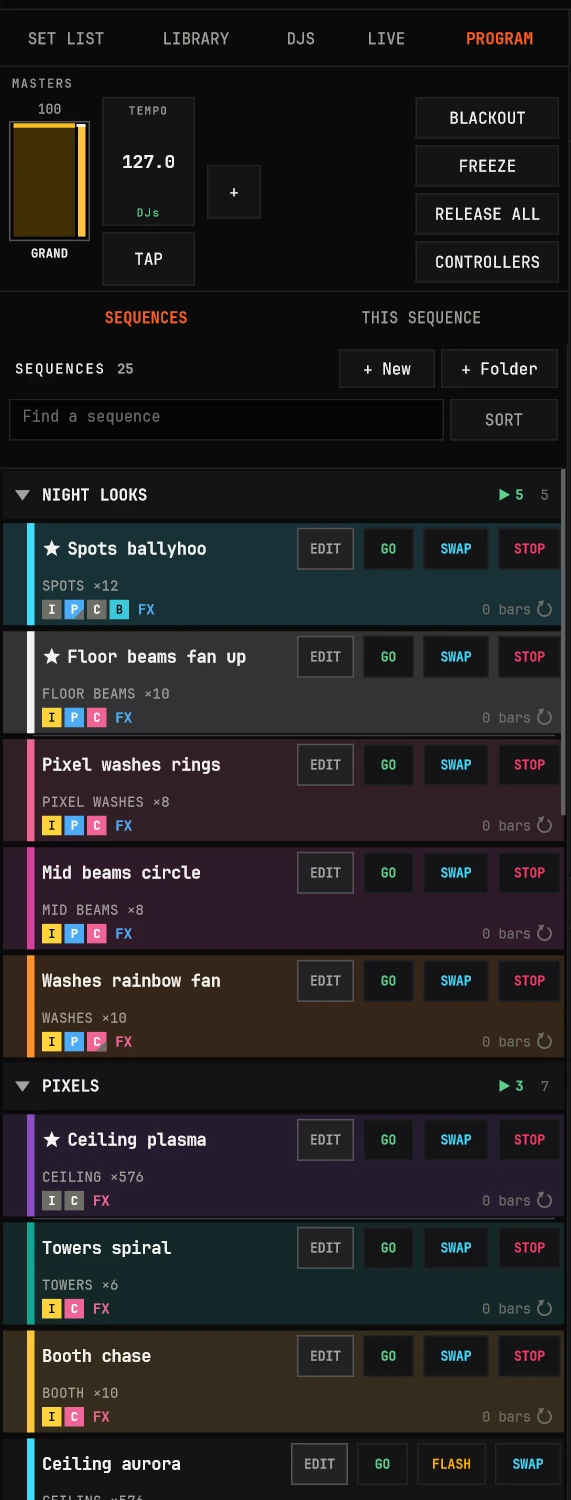
SequencesEvery look, chase and song moment in folders, each row saying what it drives. GO, FLASH, SWAP and STOP right there.
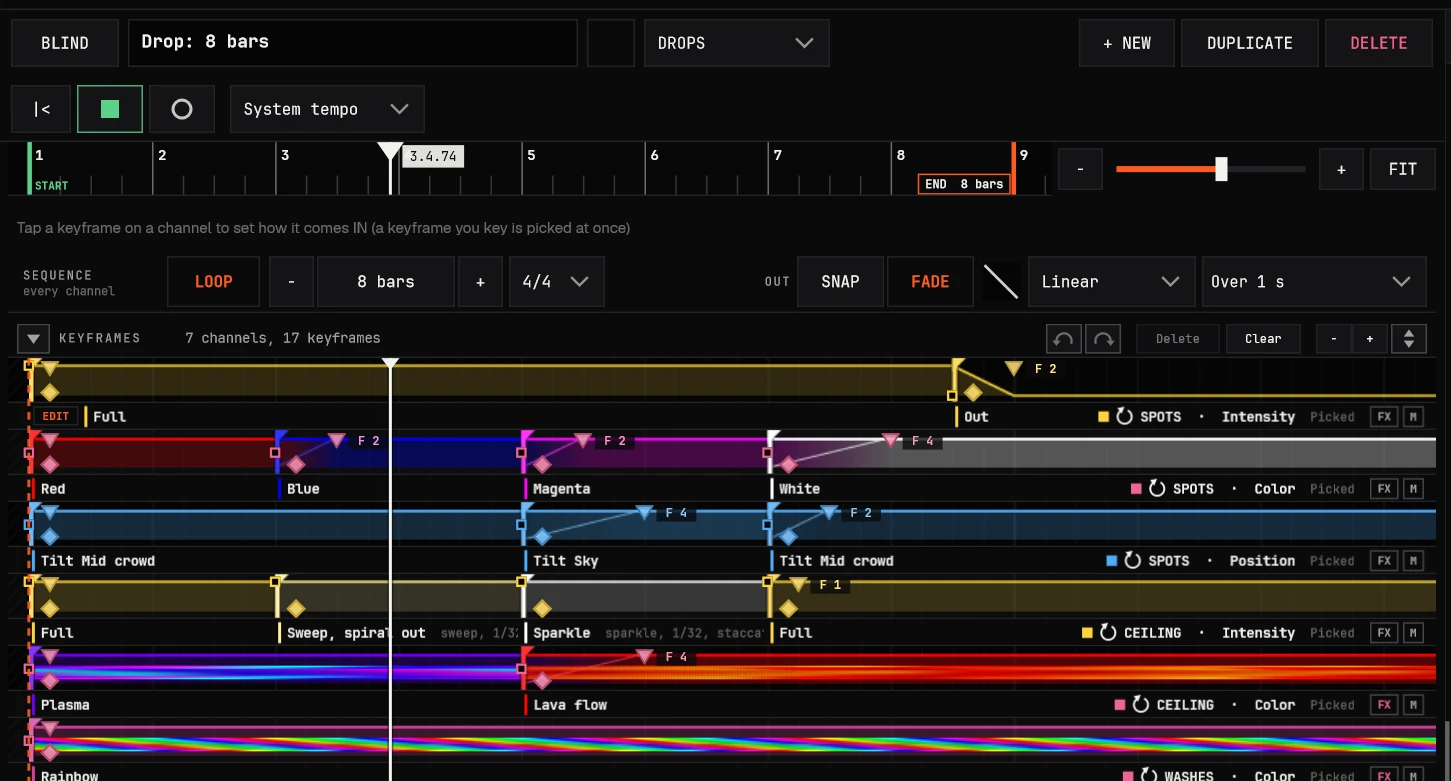
The timelineThe open sequence in bars and beats: looks keyed on channels, fades and delays you drag, effects drawn as they play.
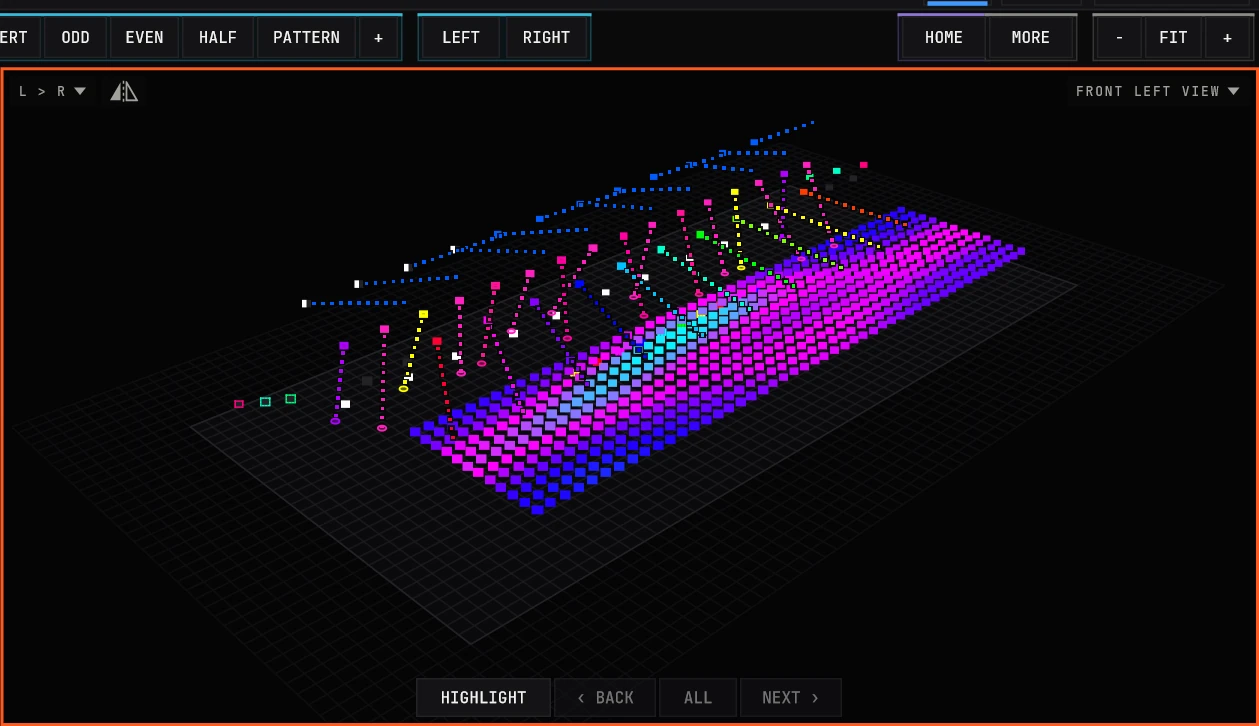
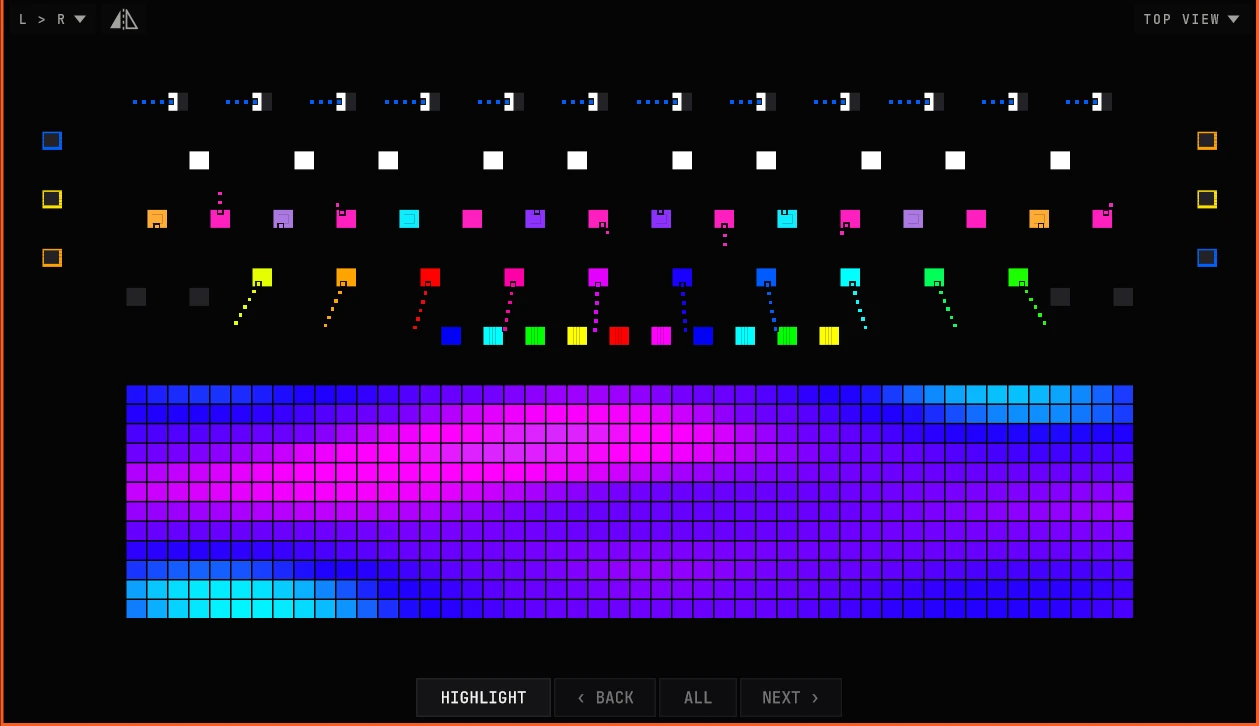
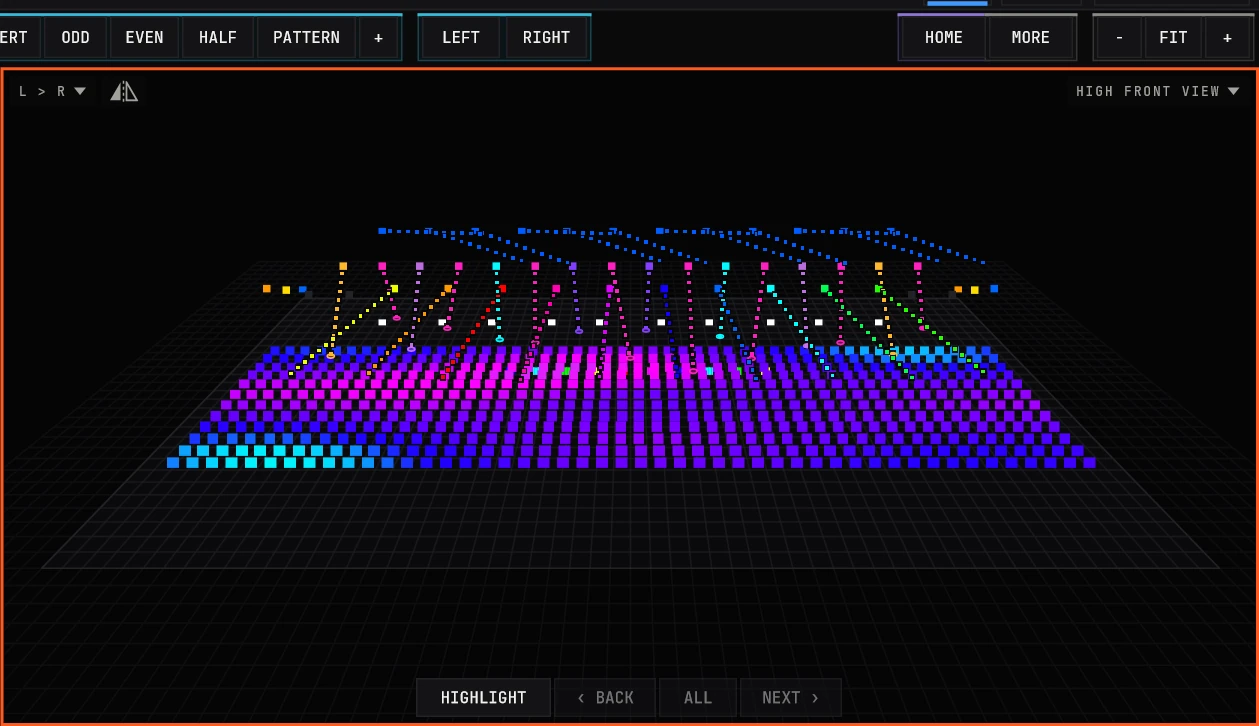
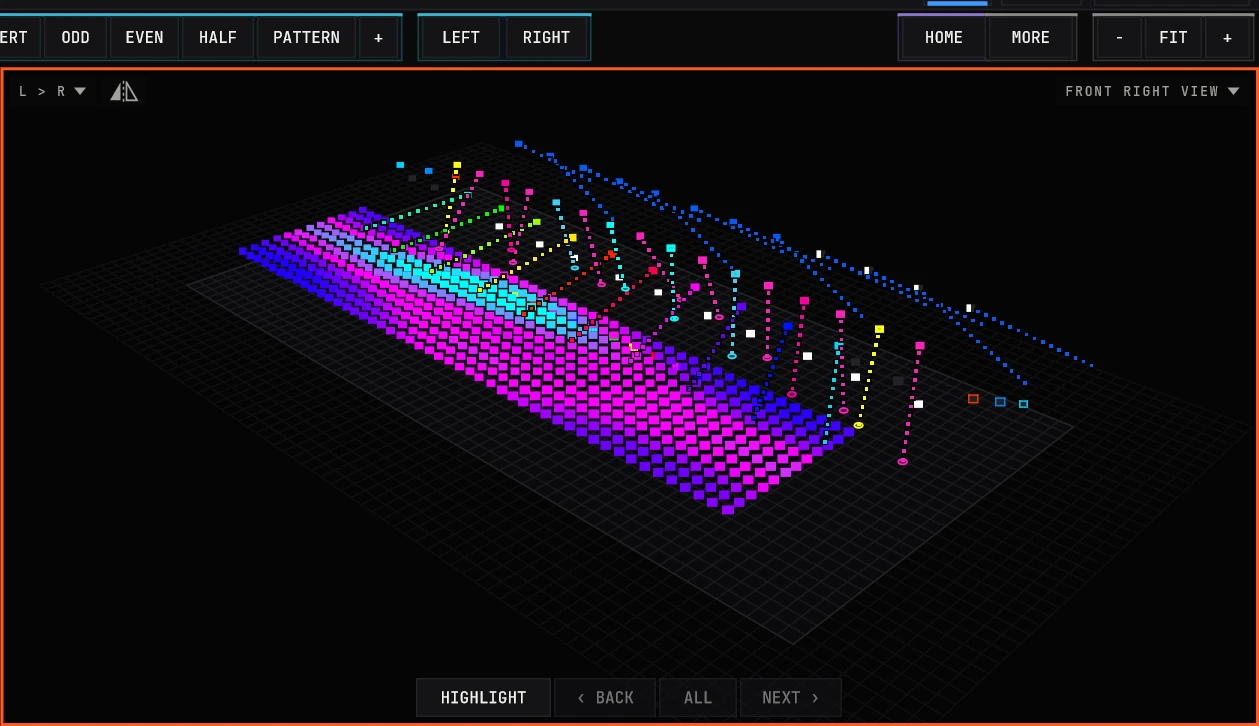
The stage644 fixtures drawn live as the rig shows them: from the crowd's eyes, from above, from any corner, with every beam.
The programmerThe CTRL ENGINE: presets in their colors, upright faders, the builders for effects, one-shots, pixels and video.
“I've spent twenty years lighting shows: designing them, running them, and programming song-by-song timecode shows that hit on every beat.
I learned the industry's biggest consoles until I knew their limits better than their manuals. Output priced by the universe. Lists inside lists. Ten button presses for things that should be one. So I started writing Lua scripts to make them do what lighting should do by itself.
cue/ctrl is what those scripts wanted to be. It isn't a copy of a console. It's the console I wanted when I started lighting as a kid: visual, fast, and open to anything with an IP address.”
It grew from the show files I've cloned for years and from training other programmers and techs: the best practices, built in, so the tool guides you instead of testing you.
01 The usual way
Consoles were designed for the hardware of the 1990s.
Small screens, no mouse, a keypad and a command line. Every look a numbered cue in a numbered list. The hardware moved on; the way you program mostly didn't, and the newer consoles copied the king of the hill.
The usual way: type it
FIXTURE 101 THRU 112 AT FULL ENTER
GROUP 4 EFFECT 7 SPEED 120 ENTER
RECORD CUE 37.5 LIST 12 ENTER
COPY CUE 37.5 LIST 12 AT CUE 38 ENTER
ERROR: CUE EXISTS. OVERWRITE? MERGE?
cue/ctrl: see it, tap it
Tap the fixtures on the stage, or drag across them in the order you want.
Tap a look: Full, Cyan, Fan wide, a ballyhoo. It plays on the rig at once.
It's keyed at the white bar on the timeline. There's no record step.
GO. Or drag it onto a song.
01 What stands in the way
Three walls between you and the show.
$ /U
Cost per universe
Output sold by the universe or the parameter, unlocked by keys, wings and nodes. A bigger rig means a bigger invoice before a single light moves.
>_
Syntax and lists
A language to learn before you can light anything. Cue lists, cue directories, pages of executors to remember, and a command line that never forgives a typo.
[ ]
Hardware lock
The show runs on their box, their wing, their node. Your controllers, your network and your computer come second.
cue/ctrl takes all three down: unlimited universes, visual from the first tap, any hardware.
01 Artistry, remembered
Not flash and trash.
Auto-lighting apps
"Analyze" a song and spray random looks on it. It's quick, and every song ends up looking the same: rule-based moves with no meaning and no artist behind them.
cue/ctrl
You program the moment once: by hand on the timeline, by recording what you play on your controller, or by capturing another console's DMX. Then it comes back on that bar every time the song plays, for every DJ, every night.
What a club's library looks like after a few weeks of nights
0
Songs it knows
0
Lighting cues on them
0
Audio references
0
Nights logged
01 How it's built
Five principles in every screen.
Visual first
You see the look before you keep it: on the stage, on the timeline, on the controller's own lights.
It remembers
Songs, sets, DJs, the parts they play, every vote. Nothing you programmed is ever lost by a click.
Anything triggers anything
MIDI, OSC, DMX, timecode, a key, a song, a beat, another sequence: into any output.
No lock
Unlimited universes. Your computer, your controllers, your nodes. Offline if you like.
Built for the show
A 1 ms clock, a merge every 8 ms, a restart with the show in about a second if Windows lets you down.
Who it's for
Weekend and mobile DJsResident club LDsBar and lounge ownersBands on timecodeTouring programmersProduction companiesVJs and visual artistsHouses of worshipEvent venues
02 The DJ side
It follows every deck.
cue/ctrl listens to the DJ software, the CDJs and the mixer. It knows what's playing, where in the song, and which deck the crowd hears, and fires your lighting there, to the millisecond.
02 Plug in
Plug in. It finds the booth.
DJ software
Nothing to install
One activation on the DJ's laptop. Title, artist, BPM, pitch, playhead, play, loops, scratches and hot cues come over the network, every 25 ms.
Players and mixers
The club's gear
Pioneer CDJs, the DJM and the DJ's own library over Pro DJ Link, with their hot cues, colors and memory cues. Two DJ computers at a changeover.
The mixer's MIDI
Faders that arm
The DJM-S11 built in: faders, crossfader, trims, EQs, curve, reverse, pads. Any other mixer learned in a minute: move each control when asked.
Networks
Found by themselves
Every network card at once, announced on each. The card the gear is heard on, remembered by its hardware. A router-less booth network just works.
No searching for the right network, no IP addresses to type, nothing on the DJ's computer to break.
02 Cues live on songs
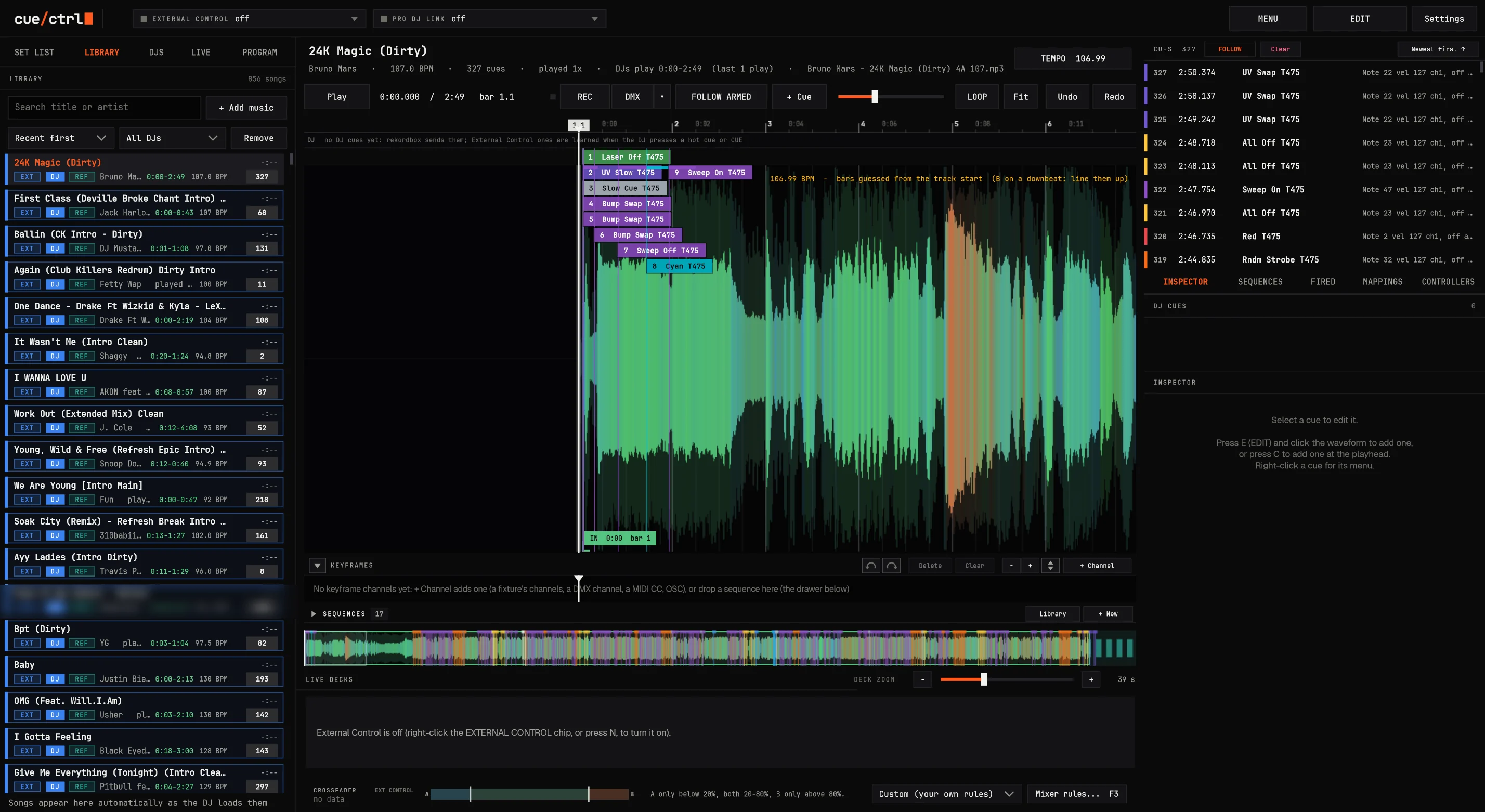
Every song remembers its lights.
The libraryEvery song any DJ has played here, with who played it, how often, its tempo and its cues: 856 songs in this club.
The song107 BPM, played once, the part the DJs play (0:00 to 2:49), its file matched on this PC.
Its lightsEach cue at its exact position, colored by what it sends. Next time any DJ loads this song, they fire there again.
What firesNotes to the lighting desk, DMX, OSC, internal triggers: checked against each deck every millisecond.
02 TRACK SHOWS
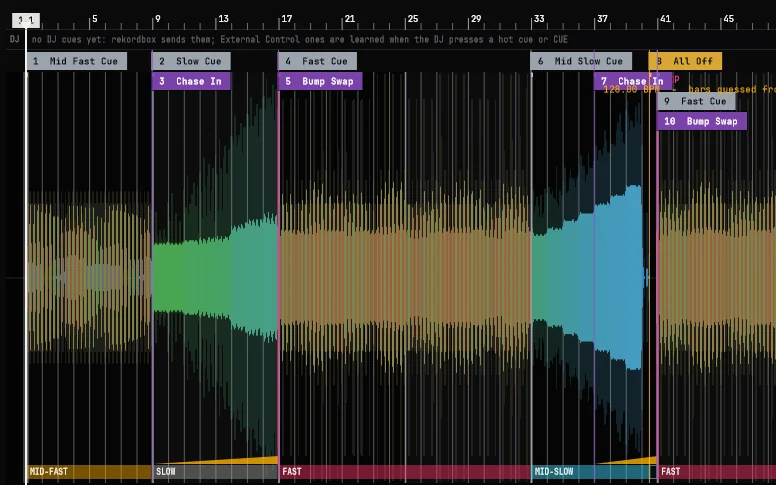
A light show written for every track, with your looks.
It listens to the song: its sections by their energy (FAST, MID-FAST, MID-SLOW, SLOW), the builds, the drops, the stops, the kicks and snares, on 4- and 8-bar lines
Your own looks fire: each kind of moment one of your cues or sequences (Fast Cue, Bump Swap, All Off...)
Learned from your nights: what you pressed at each kind of moment, offered as the choice
One song, the ones picked, or all, in the background; from its file or the booth's recording
AUTO cues: written again, only they change; every cue of yours stays
02 Arming
Only what the crowd hears fires.
The DJ cues up the next track in headphones; its lights wait. cue/ctrl watches the crossfader and the channel faders, and in a blend hands the lights to the new song the moment it takes over: as loud as the one playing. However the DJ mixes.
THE OLD SONG HAS THE LIGHTS
THE SWITCH POINT
THE NEW ONE
ARMED
Deck 2 took over: as loud as deck 1 for 200 ms, not being scratched. Its cues fire; deck 1's stop with it.
STANDBY
"Crossfader on B: cues held." Deck 1 is being cued; nothing fires until the crowd hears it.
NEVER SILENT
Missing data never silences a deck: unknown means armed. The show doesn't stop because a cable did.
Set from a club's own recorded nights: over 619 blends the old song's cues stop 0.4 s after the new one takes over (a sweet spot: 1.9 s), nothing fires from both decks at once, and scratch cuts don't flip the lights. Other rules by preset (the sweet spot, a hard cut, scratch and battle, upfader mixing, only the loudest, every deck heard, ignore the mixer) or your own. Everything held is logged with its reason.
02 REC
Play it once. It's programmed.
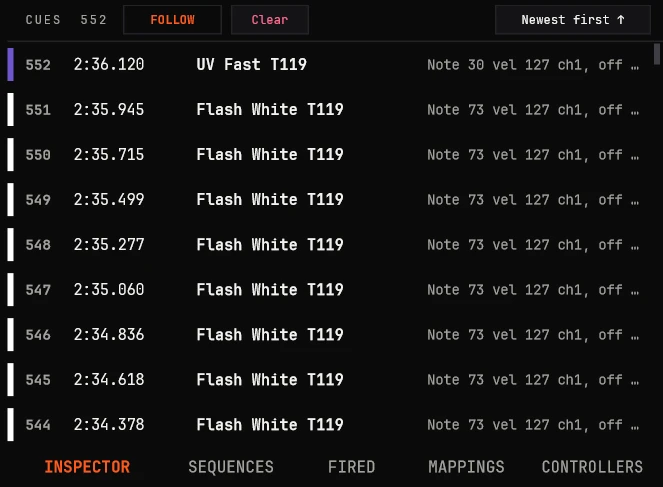
Run the lights on your controller while the DJ plays. cue/ctrl writes every press, every fader move and every program change onto the song, at song positions. Next time it's played, by anyone, it plays back.
Each press a cue, its release where you let go
Faders as curves, thinned to what matters
Snapped to the beat, or earlier by your reaction time
Takes: T1, T2... undo the last one, keep the rest
All night: it layers, the song's cues keep firing
It follows the mix: the song the crowd hears; in a blend, the new song gets its first cues from the moment it took over
552 cues, recorded live
552
cues on one song
0-250ms
reaction time taken off
1ms
firing clock
02 REC DMX
Your console's show, captured onto the song.
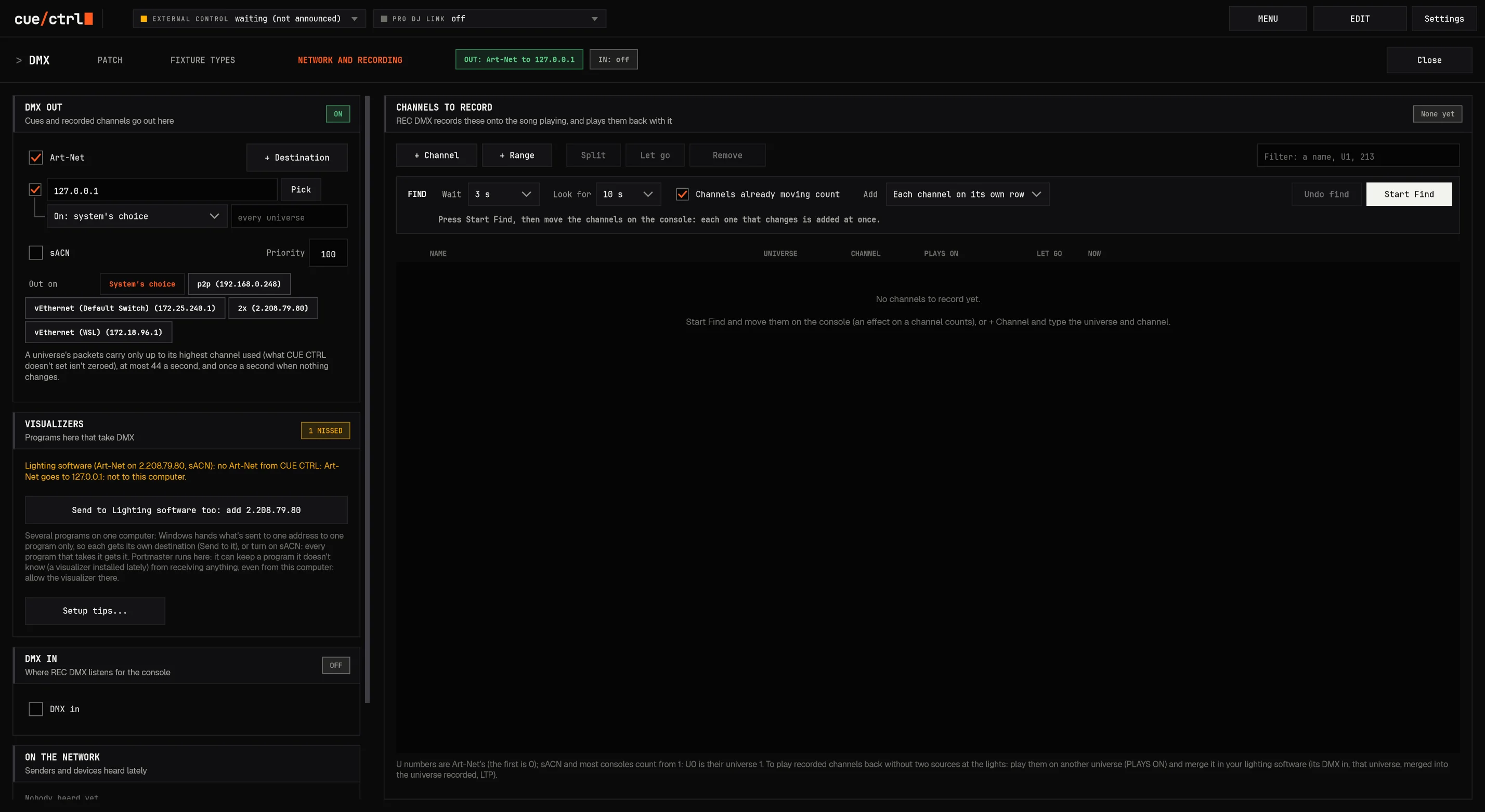
Keep running the desk you love. REC DMX records the channels you choose from any console, on Art-Net or sACN, onto the song. Next time it plays, cue/ctrl sends it back, through the console's own merge, so it doesn't matter where the DMX first came from.
Find
Move the channels on the console; each one found is added, rows by universe with their names.
Only changes
Thinned to 30 ms a channel. Rename a row and every song's recording follows.
Anywhere out
Back on another universe or channel, or let go. Costs nothing while it's off.
The DMX doctor
What's wrong in plain words, and the one thing to do about it.
OSC records too: a tablet's buttons become cues, its faders become curves. Any signal in, any signal out: DMX to MIDI, MIDI to OSC, OSC to DMX.
02 Connected to everything
Any input. Any output.
Every button, every key, every cue can send MIDI, DMX, OSC or a keystroke when it runs, and anything can run it. Map a mixer move to a DMX channel, a hot cue to a video clip, a timecode to a scene.
02 Mappings
The DJ's pads light the room.
Anything the DJ does can drive the lights: a pad, a hot cue, a scratch, a fader. And it knows the pad mode, so a hot cue never sets off the explosion.
The explosion sample sets off the explosion: blinders, a white hit, the pixels' burst
The DJ's audio tag pops the logo on the pixel wall, in sync
Songs about money fire the money clip on the video server, every time, with nobody thinking about it
Deck actions (load, play, stop, hot cue, loop, scratch) into MIDI, DMX or OSC
02 The set list
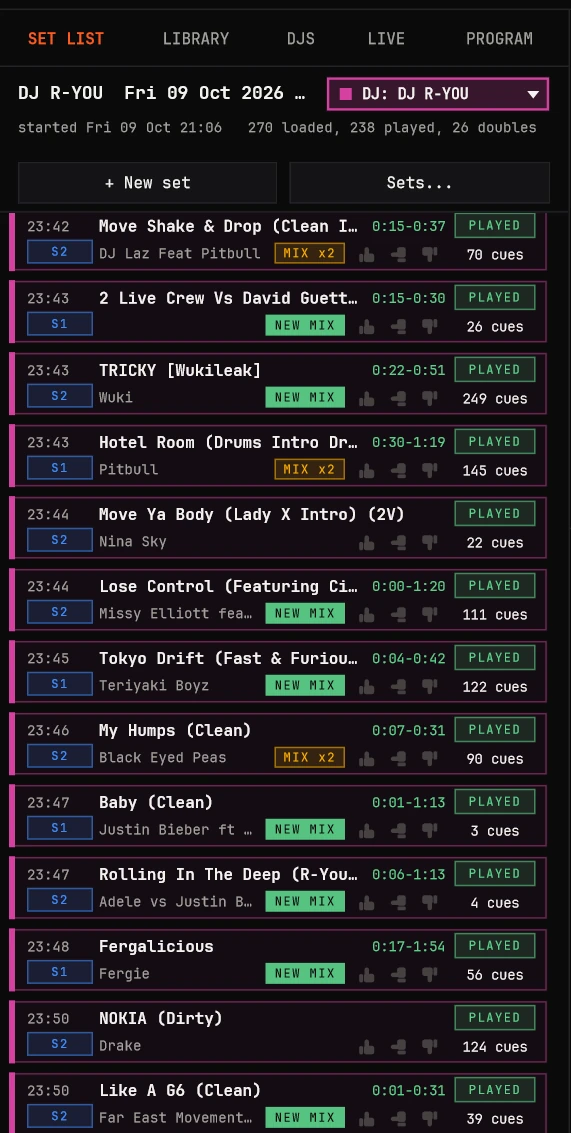
Every night, logged as it happens.
Every song loaded, played after five seconds, and the part the crowd actually heard. The DJ is recognized by their computer the moment it connects; a new night starts a new set by itself.
NEW MIX
The first time this DJ follows A with B. MIX x3 when it's a habit.
x2
Doubles: the same track on both decks at once, counted as one row.
VOTES
Thumbs up, neutral or down for each track, from F6-F8, a controller button or OSC.
SPLIT
A set that ran over two nights is split at its gap with one tap.
A real Friday
02 DJ analytics
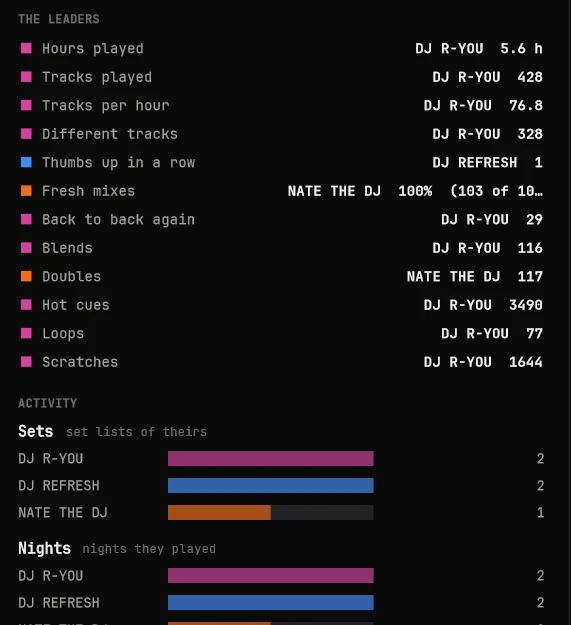
Know your DJs.
Every set feeds each DJ's numbers: what they play most and which parts, the pairs they repeat back to back, how fresh their mixes are, their longest runs in the same order, and what they do on the decks.
0
Hot cues, one DJ
0
Scratches counted
0
Fresh mixes, one night
0
Tracks an hour
0
Doubles in a set
0
Back-to-back repeats
Freshness, back to back, the longest runs, blends, how long a track is heard, tempo range, the crowd's favorites, thumbs up in a row: side by side in ALL DJS, in each DJ's color.
All DJs, side by side
02 One DJ
One DJ's page
Light the DJ, not just the song.
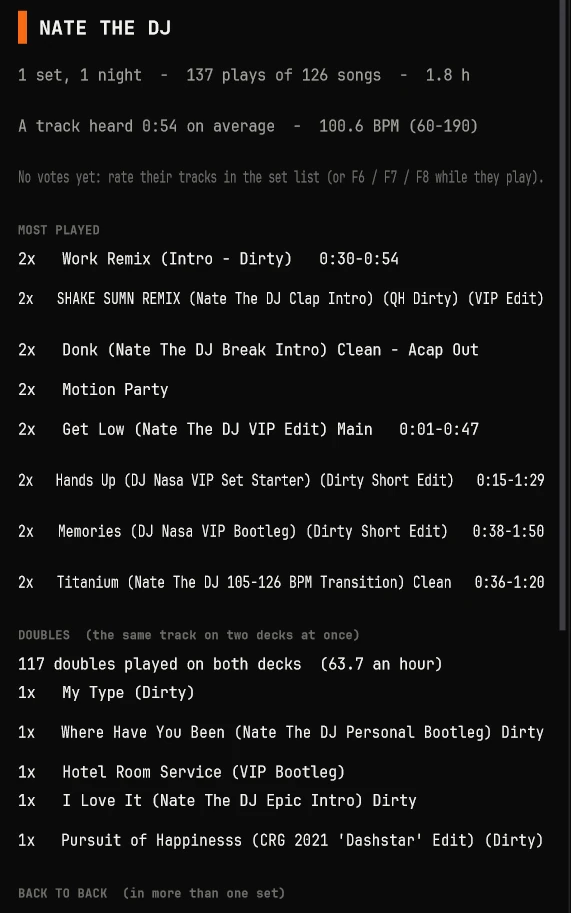
Their most played tracks, and which part of each. The doubles they love. The tempo they live at. Program for the way a resident actually plays, and get ready for a guest from their first night.
Sets, nights, plays, songs, hours behind the decks
Most played, with the part they play (0:30 to 0:54)
Back to back: the pairs they repeat across sets
Freshness: 82 % fresh is 41 new mixes out of 50
The longest run they repeat in the same order
On the decks: hot cues, loops, scratches, CUE presses, pads, crossfader cuts
02 Set playback
Program Friday's set on Tuesday.
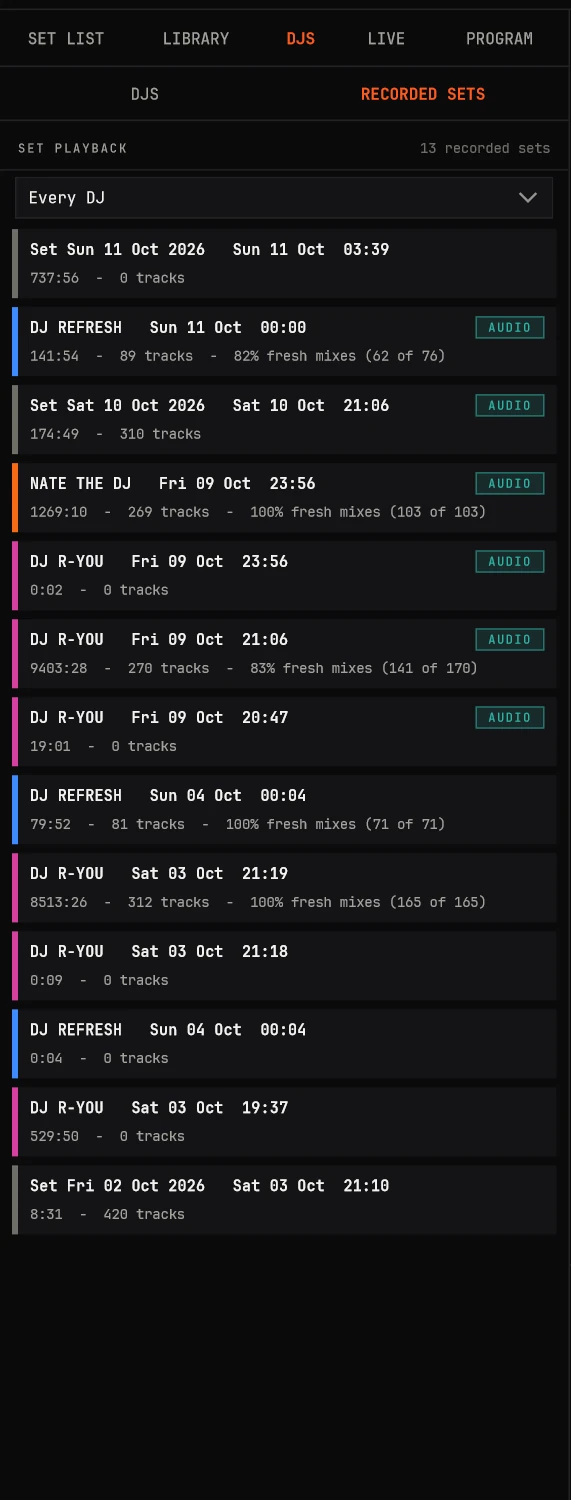
Every set is recorded as it's played: which track on which deck, every play, pause, hot cue, loop, scratch and pitch move, the faders and the crossfader, and the room's own audio. Play it back on decks of its own, exactly as the DJ did it, and light it in an empty club.
~1MB
an hour of moves
+15MB
with its audio
REC
over it, like live
Jump around by clicking the song, let today's arming rules decide, and watch the cues fire. The live decks always come first: a DJ plugging in takes over.
Recorded sets
02 Deep dive
What it learns by watching the decks.
DJ cues from the playhead alone
The DJ software doesn't send its cue points, so cue/ctrl learns them: a HOT CUE (an instant jump that plays on), CUE (back and stopped), a LOOP (wrapping round), a JUMP (a needle drop), each counted. Scratches and backspins are recognized as scratching, never as cues. From CDJs it reads the real hot cues with their colors and comments. Double-click a DJ cue: a lighting cue on it.
The part the DJs actually play
Positions heard while the deck is armed and playing steadily; a play is 20 seconds heard; the last five plays per song. The part half of them played becomes "the part the DJs play": IN and OUT lines with time and bar, the middle values so one odd mix doesn't move them. The rest is grayed in the editor.
Waveforms without touching the DJ's computer
Nothing is ever read from the DJ's laptop during a set. A local copy matched by title and artist, a mapped music folder, or the booth's own audio: cue/ctrl records an audio reference of every armed song (one deck in the mix, pitch undone, growing over the nights) and draws its waveform next time, kicks and snares visible.
Firing, precisely
Its own 1 ms clock projects the playhead between the DJ software's 25 ms updates; only while steady and armed; a jump forward skips, a jump back re-arms; the pitch is followed (leads and offsets scale with the rate). If the link drops, nothing fires and the console carries on.
02 Deep dive
Mixers, mappings and the song's structure.
Any mixer
The DJ software's own faders through its link, or straight from the mixer's MIDI. On a Mac the mixer's MIDI is shared over the network: nothing installed on the DJ's machine. A new mixer is learned in a minute: CC, 14-bit pairs, pitch bend, direction worked out.
Mappings
Any mixer control or DJ action into MIDI CC or notes, DMX or OSC; deck actions (load, unload, play, stop, hot cue, CUE, jump, loop, scratch start and end); the mixer's pads by pad mode (only SAMPLER lights things); on while pressed, inverted, per deck.
Controllers' names
Every button named and colored ("Strobe T19"); renaming it renames every cue that used it. Drag a button onto a song: a cue that presses it. Buttons that run cue/ctrl itself: REC, REC DMX, the votes, the LIVE show, the timecode generator.
The structure view
No waveform needed: beats as blocks, 8-bar phrases tinted in a four-color cycle (32 bars a cycle), sections between the DJ's cue points tinted and named; bars from the CDJs' grid or lined up with the DJ's most-used cue point.
Editing
Edit mode protects the show. Add at the playhead, right-click menus, select ranges, stamp a copied pattern on each click (snapped), nudge 1, 10 or 100 ms, exact times, colors, labels, test fire, align the bars, undo everything. Learn a button onto a cue.
Keyframes on songs
Smooth control of any output along the song: a fixture's function (16-bit where it has fine), a DMX channel, MIDI CC, pitch bend, OSC. Curves, bends, values by name (Red, Gobo 3, Strobe); effects written over a stretch; a recorded take turned into keyframes.
03 The console
cue/ctrl ENGINE
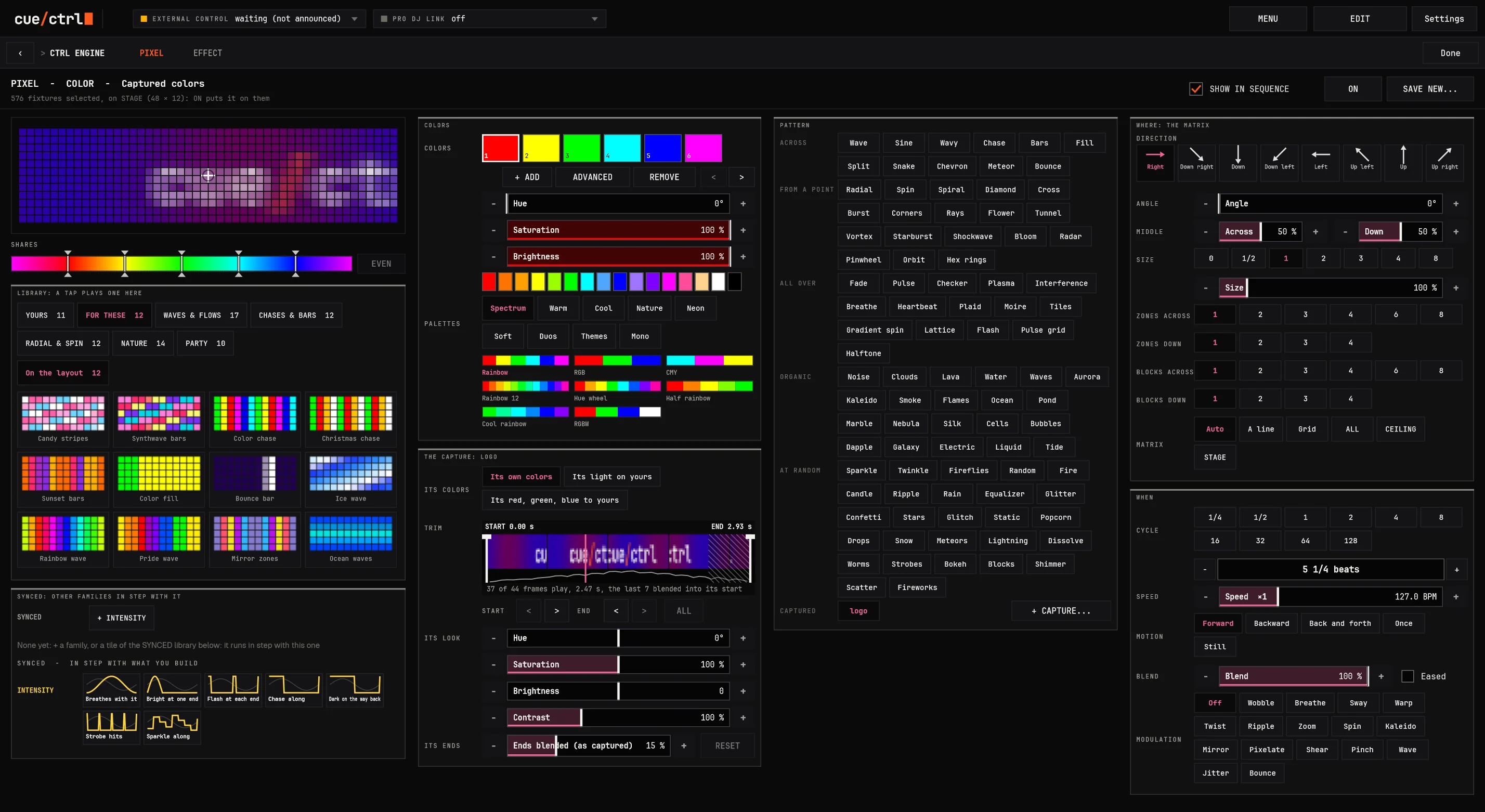
One engine under everything: looks, effects, one-shots, pixels and video, every one locked to the beat and blended the way the best consoles blend.
The pixel engine, live: TUNNEL
03 The fast path
From fixtures to a look in seconds.
PickTap boxes on the stage, drag across them in the order you want, or tap a group. ALL, ODD, EVEN, HALF and more are one tap away.
Tap a lookUniversal presets in their colors: Fan wide, Tilt Mid crowd, Cyan, Prism in. It plays on the rig as you tap it.
Or an effectA ballyhoo, a circle, a tilt chase, straight from the library: on the beat, spread across the selection.
It's keyedAlready on the timeline at the white bar. Tap another look to swap it, drag its fade, press GO.
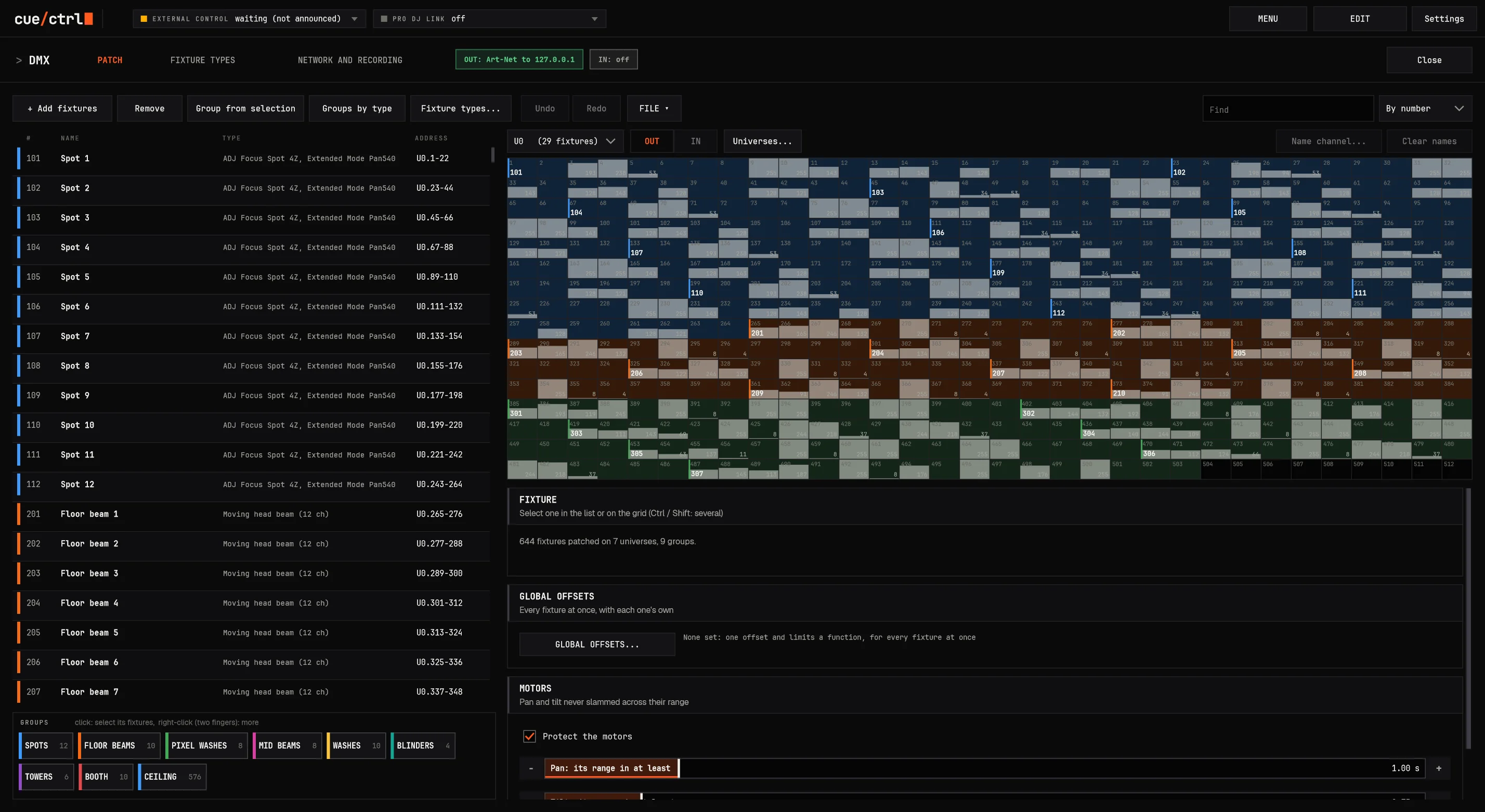
03 Patching
Patch at the speed of thought.
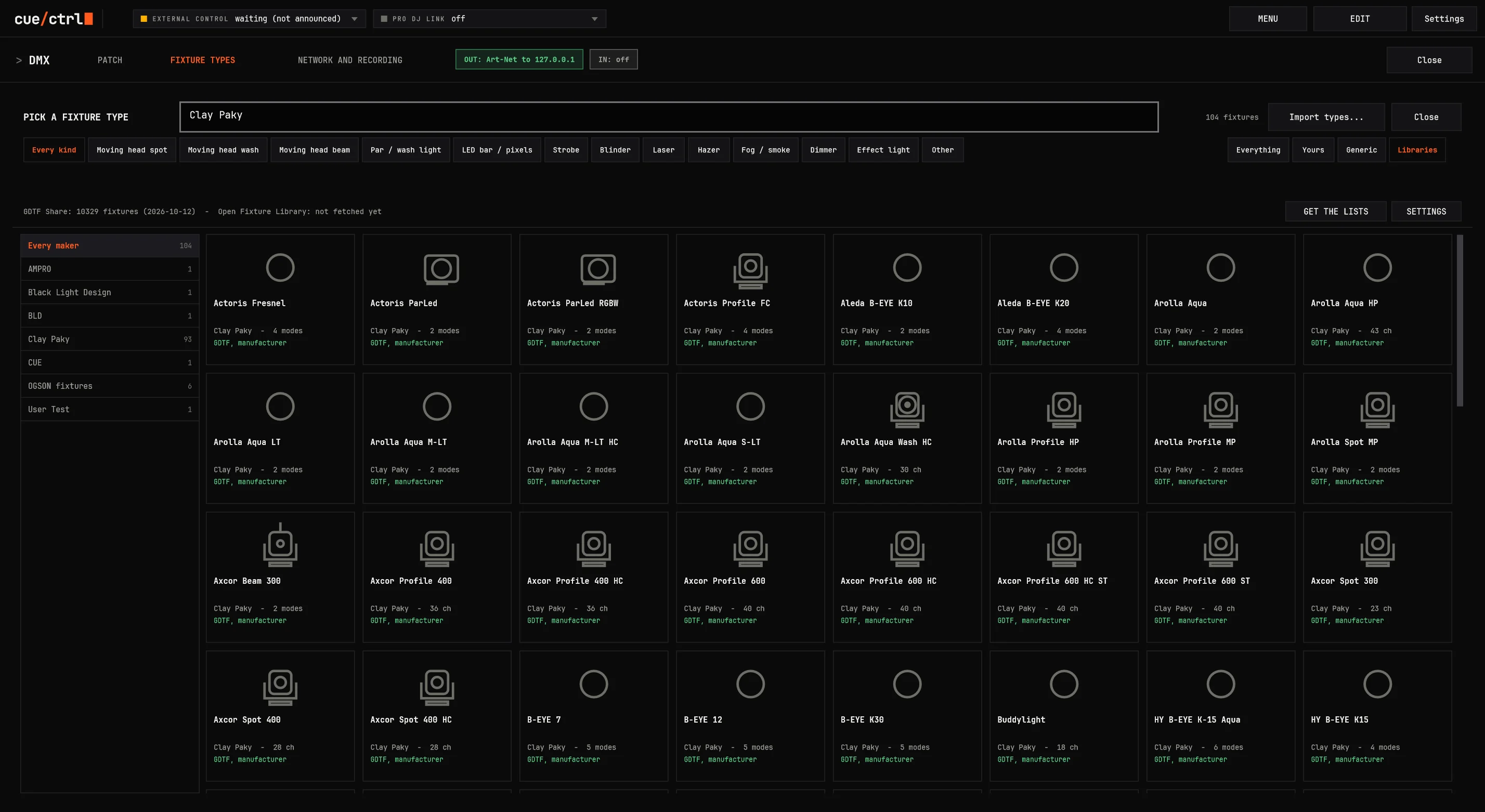
Every library inside: GDTF Share (the maker's own file first) and the Open Fixture Library, offline once downloaded
134 generic types for everything else: dimmer packs, every RGB order, pixel bars, rings, matrices
AI reads the manual: drop a PDF in any language, or a folder of them, and get the fixture type made
Multi-part fixtures down to the pixel: a wash's center and ring, a bar's cells, a 19-pixel head, each with its own dimmer
Show files in: other consoles' patch lists and CSV, unknown types matched to the best ones in one pass
03 Deep dive
The patch, every detail.
Drag to readdress: green where it fits, red where it doesn't, and what's in the way said
Offsets at every level: global, per fixture, per channel (invert, offset, limits drawn as a chart)
Swap pan and tilt, standing or hung, motor protection (pan never crosses its range faster than 1 s by default)
Cells in shapes (square, circle, triangle, hexagon, diamond) and THE GRID ADJUSTER for rings and odd layouts
A fixture on two addresses: its head mode and its pixel mode, combined
Every channel of a file read: 16-bit, gobo pictures, hue and saturation, blades, a laser's X/Y, a second prism, frost, color wheel and gobo rotation as their own
Checked against the world's files: 6,061 GDTF types and 647 Open Fixture Library types read by the test suite
New fixtures join their sequences: odd stays odd, a half grows, a fan widens, a gobo goes by its name
03 Presets
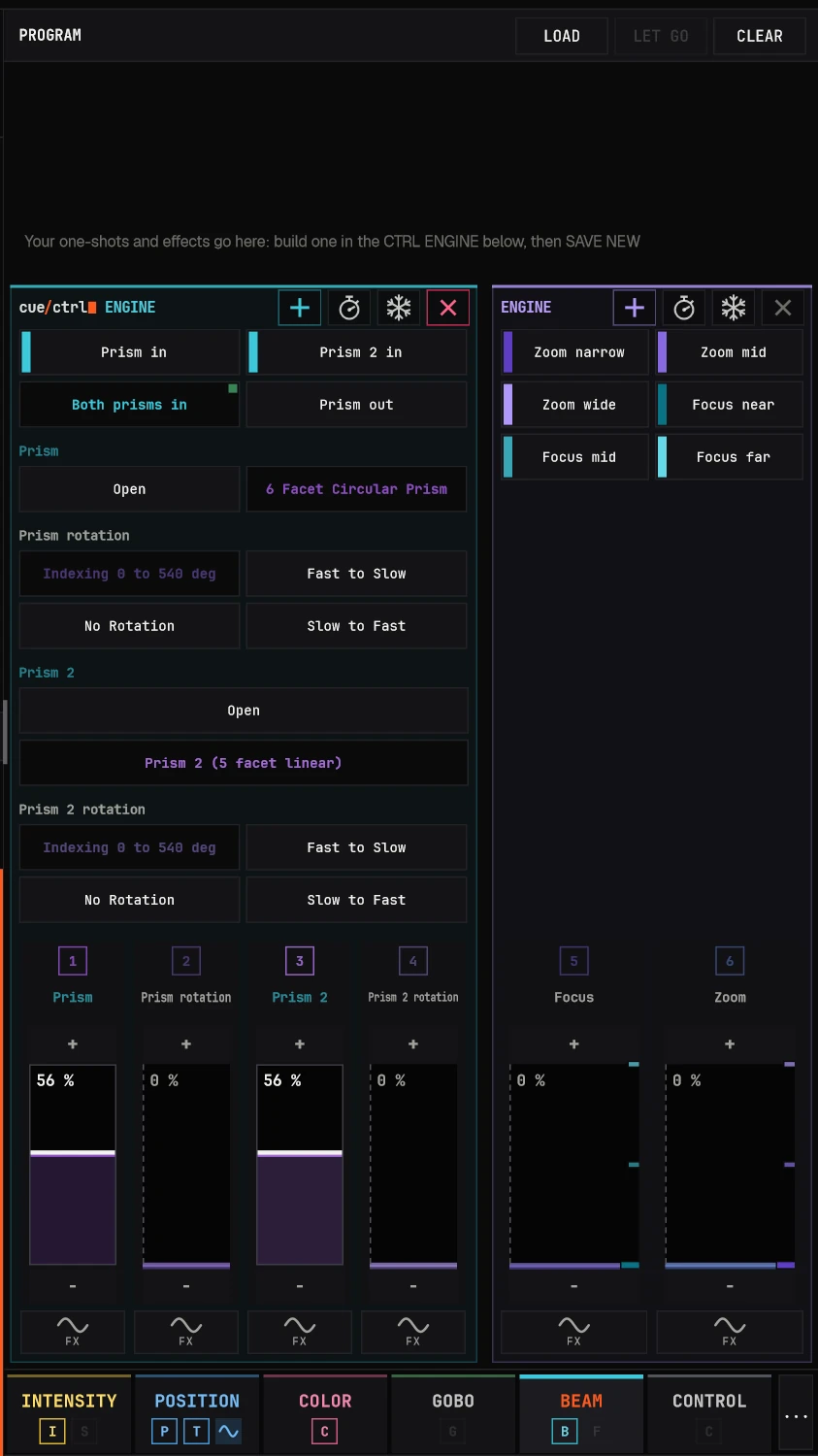
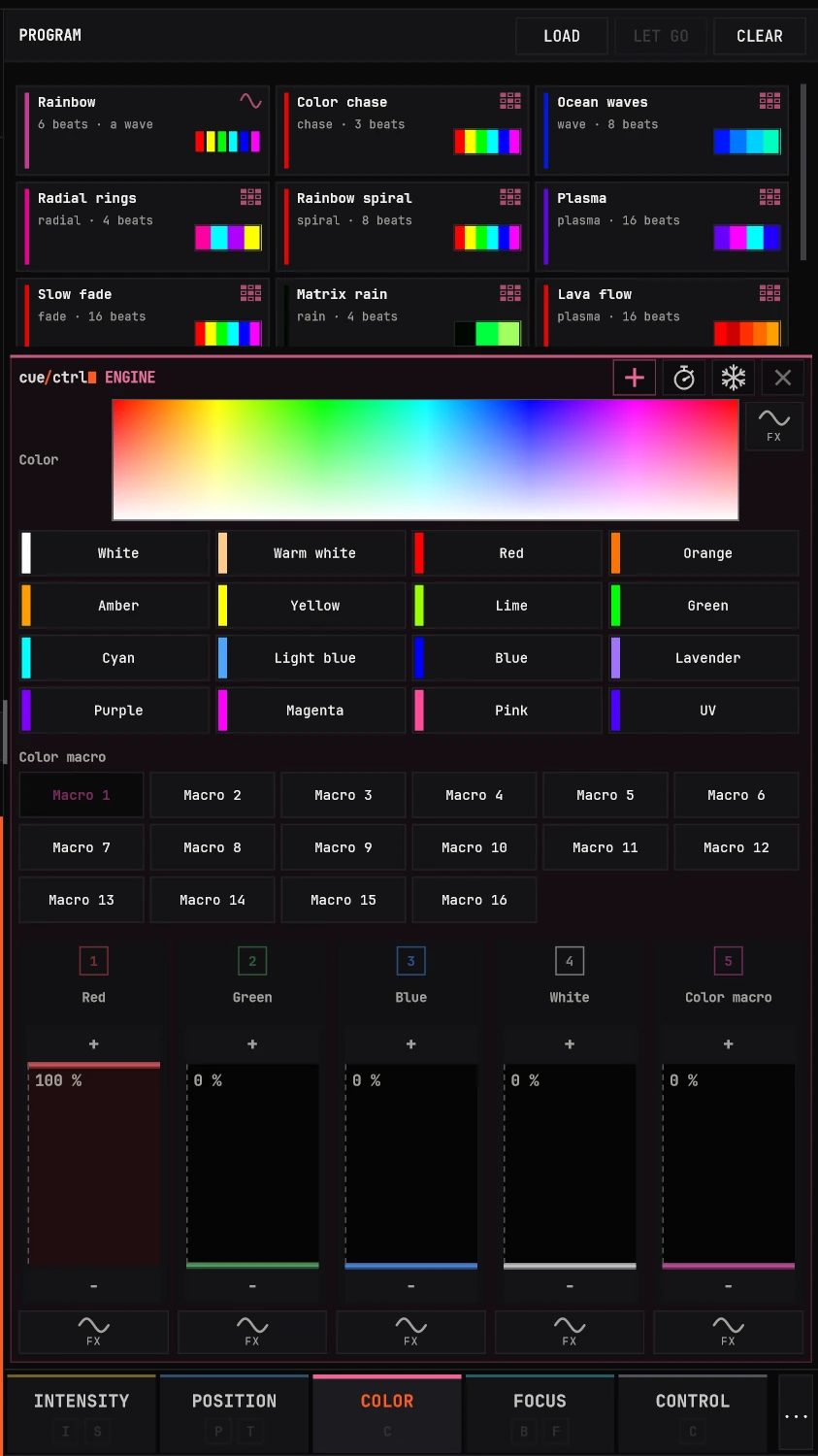
Universal presets: one name for every fixture.
One "Cyan", one "Prism in", one "Tilt Mid crowd" for every fixture you'll ever patch. Each fixture lands it its own way: a wheel light picks its nearest slot, an RGB par mixes it, a two-prism head offers both.
By reference: change Tilt Mid crowd once and every look using it follows
They set only what they set: Tilt Mid crowd and Fan play together
AUTO presets from your fixtures: every wheel slot by its own name and color, every gobo with its picture
Ranges and presets are one system: "Shutter closed" finds Close, Closed or Blackout
One fixture, two prisms
Colors, every fixture
03 Cloning
Cloning, three ways. Nothing programmed twice.
On other consoles a show belongs to the fixtures it was built on: new lights mean copying cues fixture by fixture, or programming again. Here the show follows the rig.
1. Add fixtures: nothing to clone
Put new fixtures into a group, or onto a layout, anywhere: they play what the group plays at once. A pick stays a pick (odd stays odd, a half becomes the new half), a value lands by where each one hangs, and every chase, one-shot, pixel effect and fan runs by where they sit, so a balanced rig stays balanced.
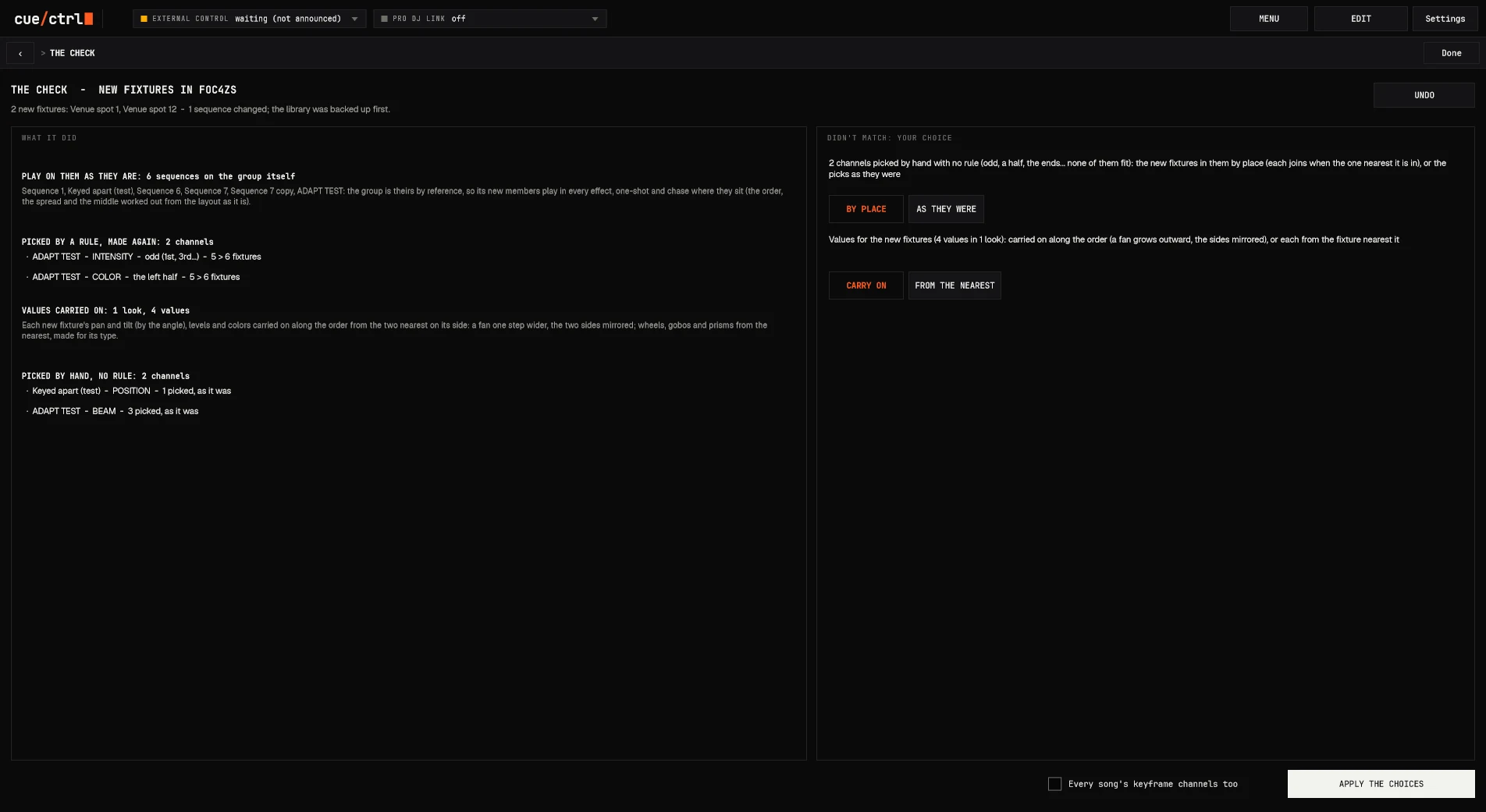
THE CHECK says what changed, in words, with one UNDO.
2. A show onto other fixtures
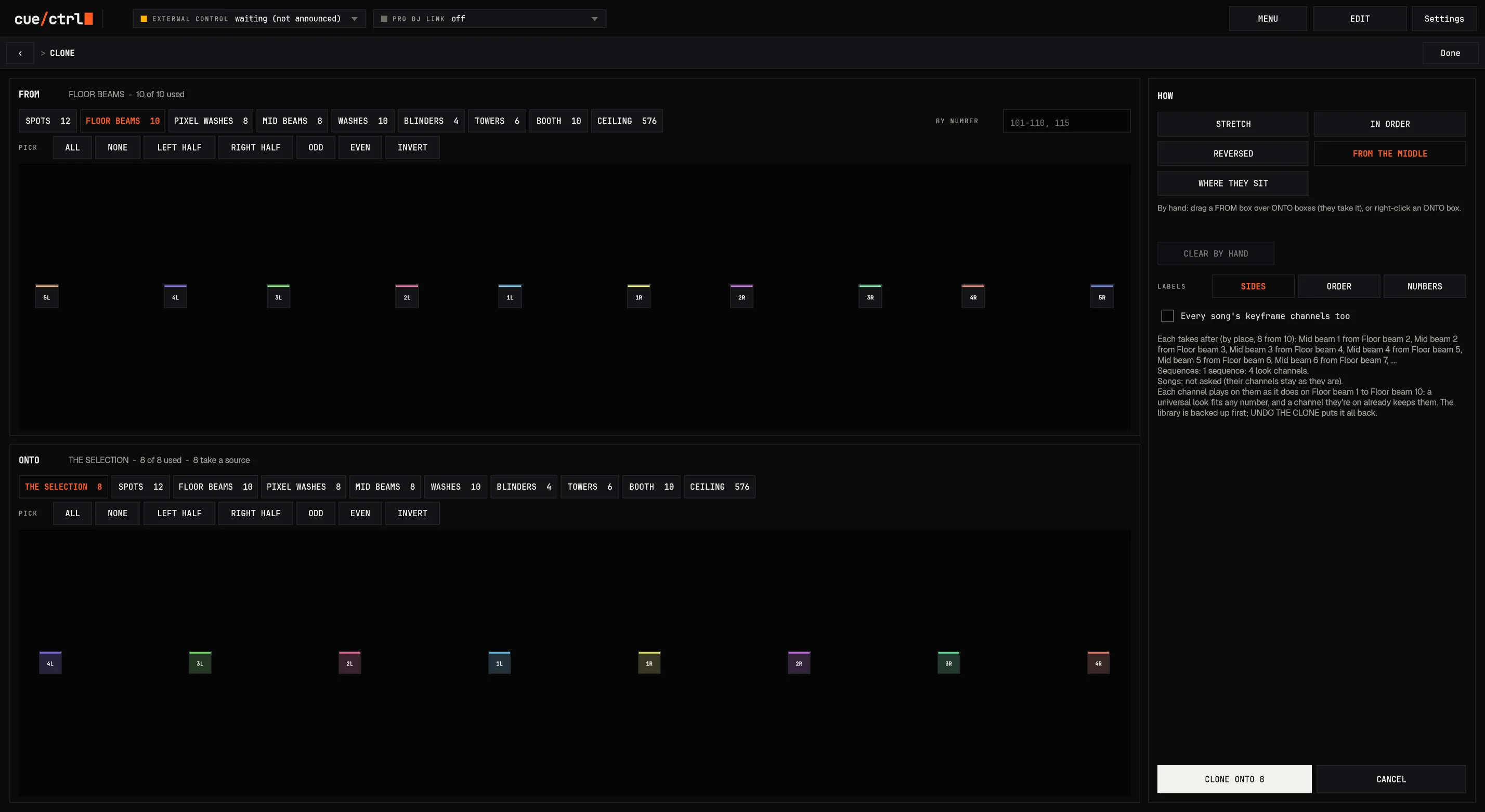
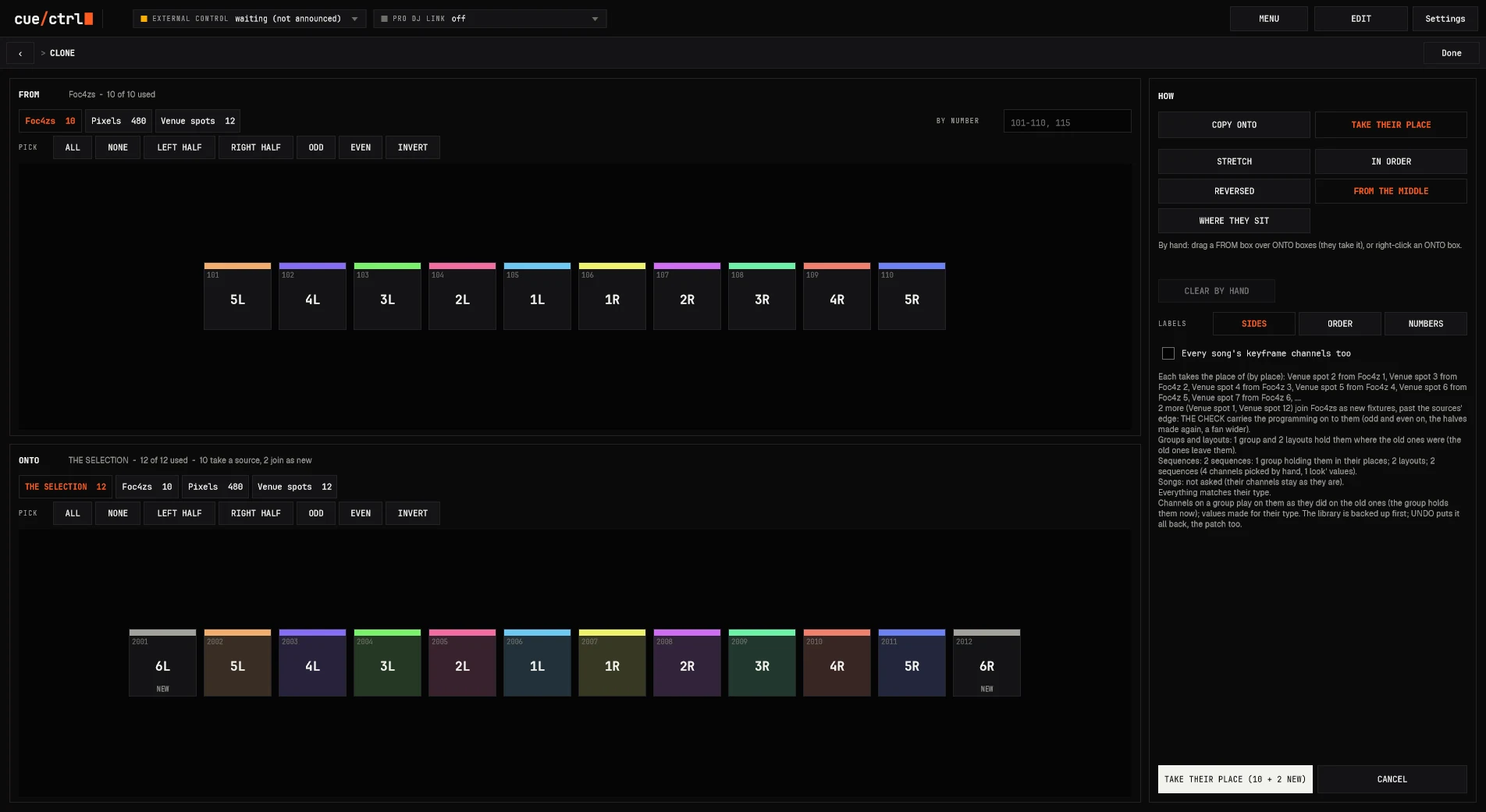
THE CLONE PAGE: the fixtures it's FROM on one layout, the ones it goes ONTO on another, side by side (1L to 1R, by hand if you like). Five ways to match them: stretched, in order, reversed, where they sit, from the middle.
COPY ONTO (the new ones get the looks) or TAKE THEIR PLACE (they step into the old ones' groups and sequences); every song's channels too; UNDO THE CLONE.
3. Another venue, another model
Walk into a club with twelve spots where your show had ten: theirs take your ten's place and the two extra join where they hang. A different model? SWAP TYPE keeps every look: the same angles on a wider pan, a gobo by its name, a color by its color.
Universal presets make it work: one "Cyan" or "Tilt Mid crowd" that every fixture lands its own way.
03 Cloning
New rig? Clone the show onto it.
The show you built for one rig, moved onto another: every look, every effect, every song's channels.
FROM and ONTO drawn on their own layouts
Five ways: stretch, in order, reversed, where they sit, from the middle, or by hand
COPY ONTO or TAKE THEIR PLACE: the new fixtures get the looks, or step into the old ones' groups and sequences
Every song's channels too, and UNDO THE CLONE if you change your mind
Or no clone at all (instant cloning): fixtures joining a group play its programming at once, every chase by where they sit
03 A new venue
Walk into any venue. Your show runs.
Their twelve spots take your ten's place: every group, every sequence, every chase moves onto them. The two extra ones join where they hang, and the programming carries on to them.
Patterns stay patterns: odd stays odd through the new ends, a half becomes the new half, the middle stays the middle
Values carry on: a fan opens one step wider, the sides mirrored; pan and tilt by the angle, not the DMX
Gobos by name, open stays open, else by slot; colors by color
Another model? SWAP TYPE keeps every look: the same angles on a wider pan, the same gobo by name
THE CHECK: what it did in words, what didn't match with a choice each, one UNDO for all of it
THE CHECK
03 Selection
One group does it all.
Other consoles want a group for every way you'll ever pick a rig: odds, evens, halves, left, right, the middle out. Shows end up with a hundred groups for the same twelve lights.
In cue/ctrl one group is enough. Pick from it any way, order it by where the fixtures sit, mirror it, and every builder follows.
28 orders by the layout: as picked, across, up and down, from the middle, rings, diagonals, clockwise, spirals, row by row, snakes. The libraries read the shape you picked: on a column, "left to right" runs down it.
Add to the rig, keep the balance: put new fixtures anywhere on a balanced layout and every chase, one-shot, pixel effect and fan follows where they sit. No cloning, nothing programmed again.
Pick
Order
03 The stage
See it before the room does.
Front left
Top: the plan
High front
Front right
644 fixtures, live: twelve spots on a ballyhoo, ten floor beams crossing, pixel washes in rings, a 576-pixel ceiling running plasma. Ten views (top, high and low front, the four corners, back, left, right), dotted beams to their pools on the floor, INFO off to see only the light.
03 The merge
Base values and effects, merged like a top console.
The programmer above everything, fixture by fixture; a FLASH or a SWAP over the rest while held
Effect into effect at the same point of its cycle; a movement replaces a movement
Pan and tilt fade with no jumps, even from a moving source
A sequence takes over fixture by fixture as it reaches them; channels let go with another
Fades keep their times: STOP from wherever the light is, over its OUT
Mark: moves in black before a fixture is seen
Multi-part fixtures: a dimmer per part, the fixture's own as high as its brightest part
03 The programmer
The programmer, rethought.
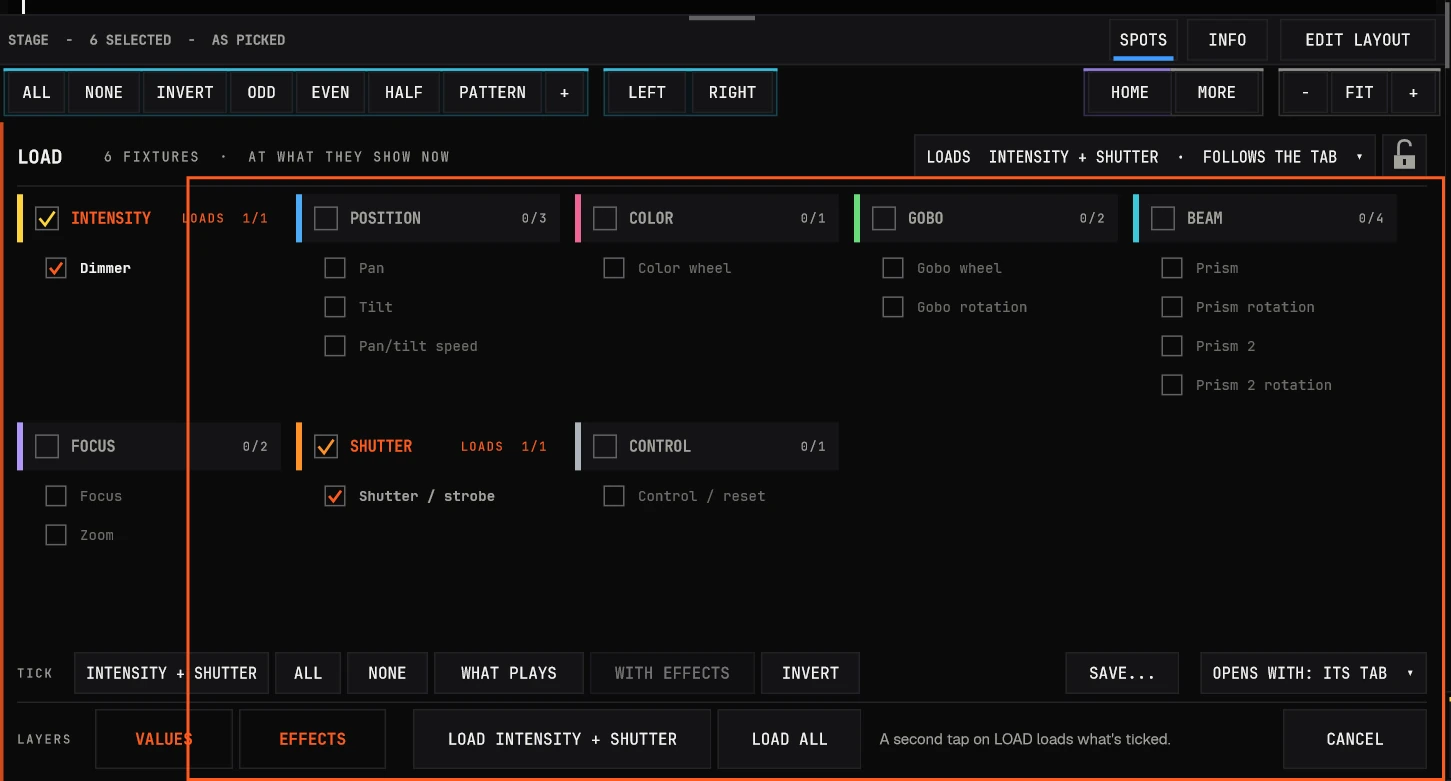
Tabs by family at the foot: INTENSITY with SHUTTER, POSITION, COLOR, GOBO, BEAM with FOCUS, CONTROL
Upright numbered faders: the value inside, every preset marked in its color; thinner when a family has more
The pan/tilt pad: padlocks per axis, ABSOLUTE or RELATIVE, FINE, NORMAL or FAST, a 540-degree pan waiting at the edge
FREEZE (effects, output, blackout) and RATE (x5 to /5), keyed like any look
LOAD: what's playing on the selection into the programmer, following the tab; LOAD, LOAD loads the tab's families
LET GO, CLEAR, HOME, HIGHLIGHT with BACK and NEXT one fixture at a time
03 The secret sauce
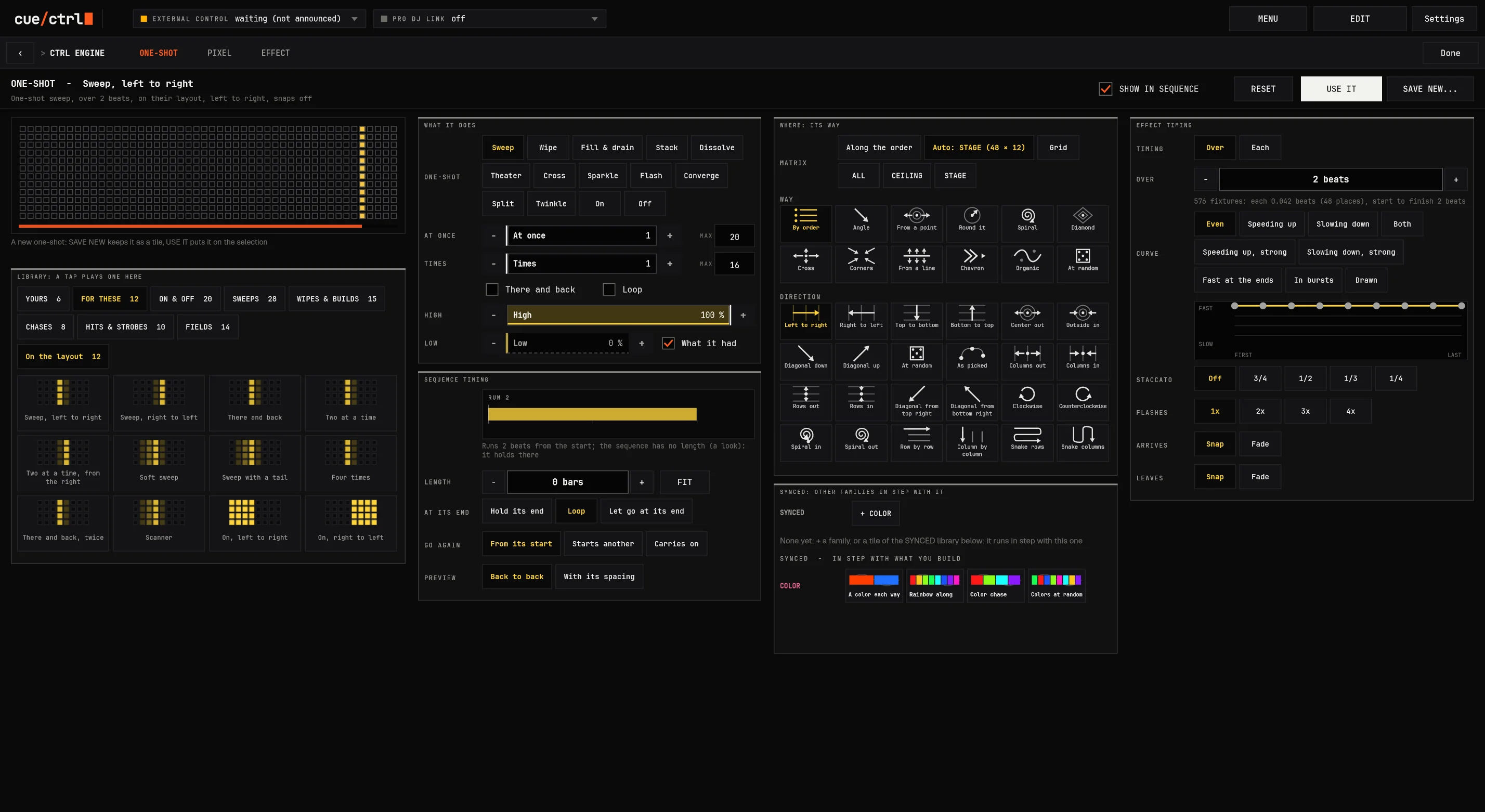
The one-shot engine.
A hit that travels the rig the way you choose: a sweep, a wipe, a fill that drains, a spiral that builds, a burst of strobe from the middle out.
95 ready to tap, and any of the pixel engine's shapes as its way
Timed in beats or notes: eighths, sixteenths, triplets, staccato
Nine curves and one you draw; OVER is the whole run
LEAVES fades finish, GO again and the last pass ends while the next begins
Takes over fixture by fixture, on the layout they're on
Its way
03 ONE-SHOT, full screen
One screen, nothing to scroll: the picture in your rig's shape, every option in its group.
03 Pixels
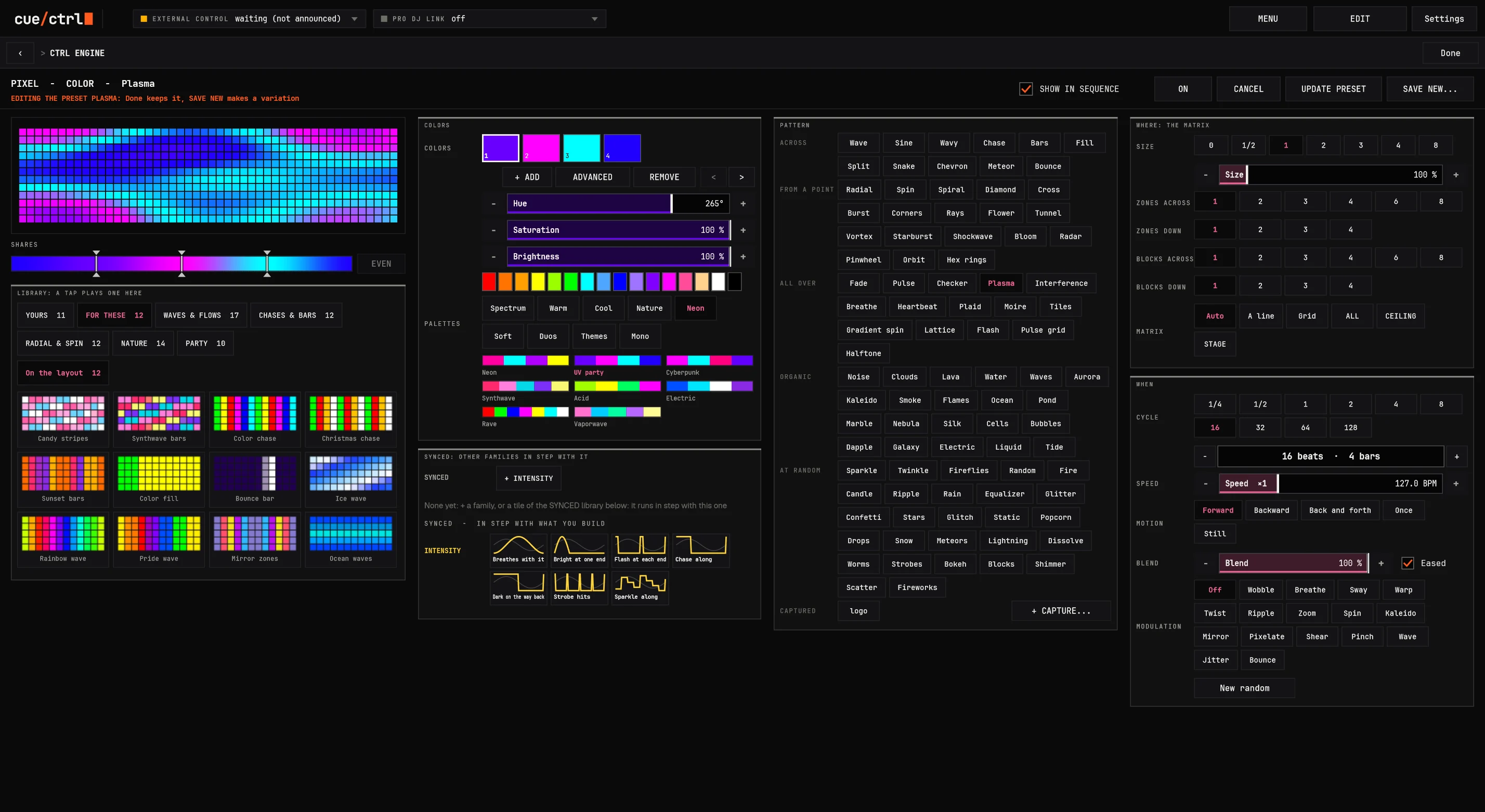
A pixel engine that thinks in shapes.
81
patterns
from a point 18, all over 15, organic 21, at random 27
16
modulations
wobble, warp, twist, kaleido, mirror, pixelate...
72
palettes
in nine groups, or your own colors
100%
seamless loops
every pattern, at any length in beats
Smoke, flames, ocean, marble, nebula, lightning, fireworks, tunnels, vortexes, radar. On color or on intensity (a pixel chase of dimmers), over cells in their real shapes.
03 Capture
Video in. Light out. Almost no CPU.
Drop a video on cue/ctrl. It's framed, trimmed and sampled to your fixtures' cells at a frame rate, then only its light is kept, never the video. Big pixel rigs play captured looks for a fraction of a media server's load, and the looks travel inside the show file.
MP4, MOV, WMV, AVI, MKV, WebM, GIF, and with FFmpeg installed DXV3, HAP, ProRes, NotchLC
Its look: brightness, contrast, gamma, saturation, threshold, invert, soften, the ends blended
Changed after it's taken: TRIM by its frame-change graph, hue, contrast, its ends
Size in degrees, rotation, middle, direction, speed
Cycle 4 to 1024 beats, phase spread, blocks, groups, slices to 64, WINGS
The picture is the rig itself, from any of FIXTURES' ten views, its beams moving at a real head's speed
One CTRL ENGINE: every family of the selection a tab at its top, each opening on what plays
03 SYNCED
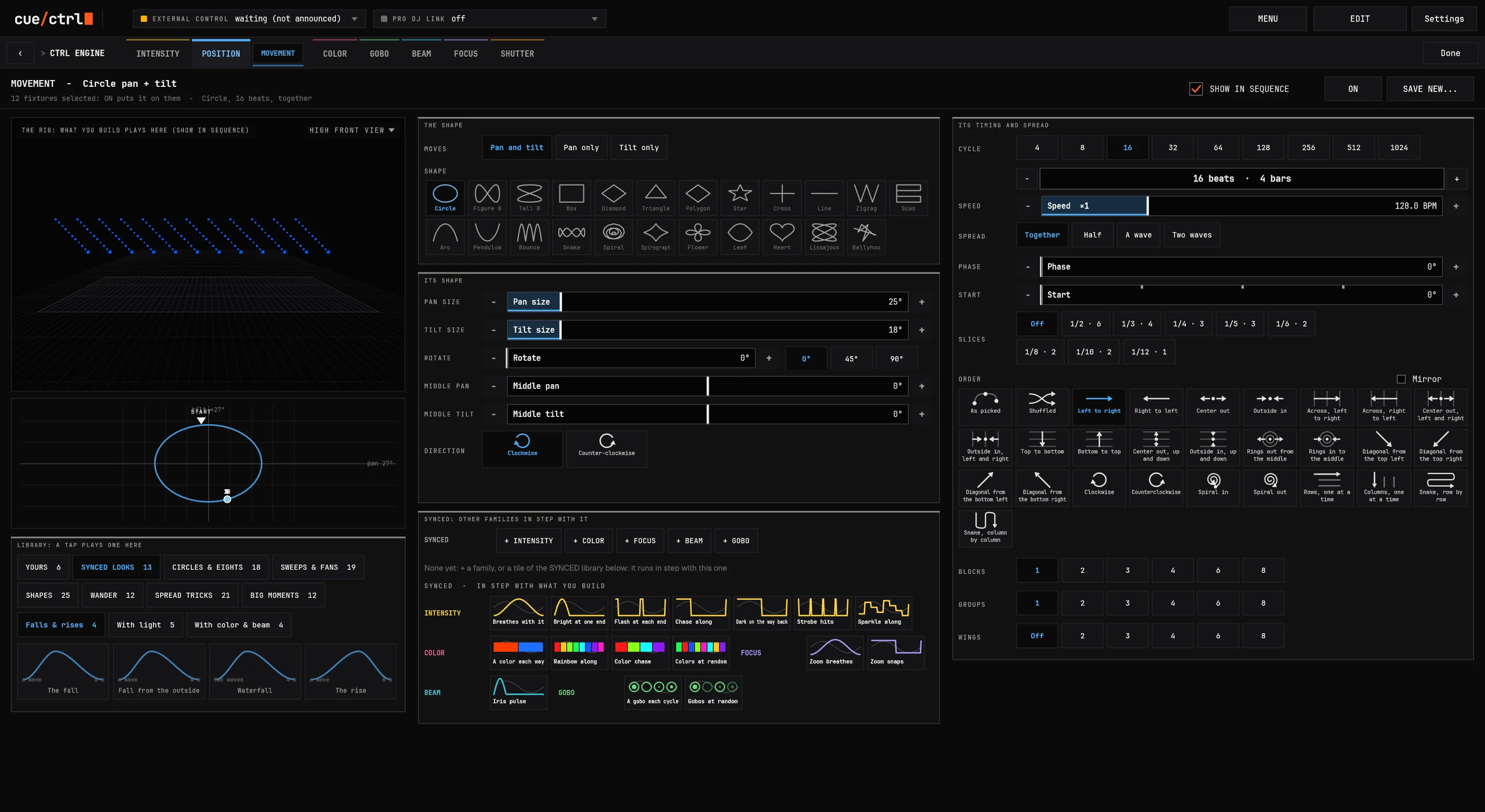
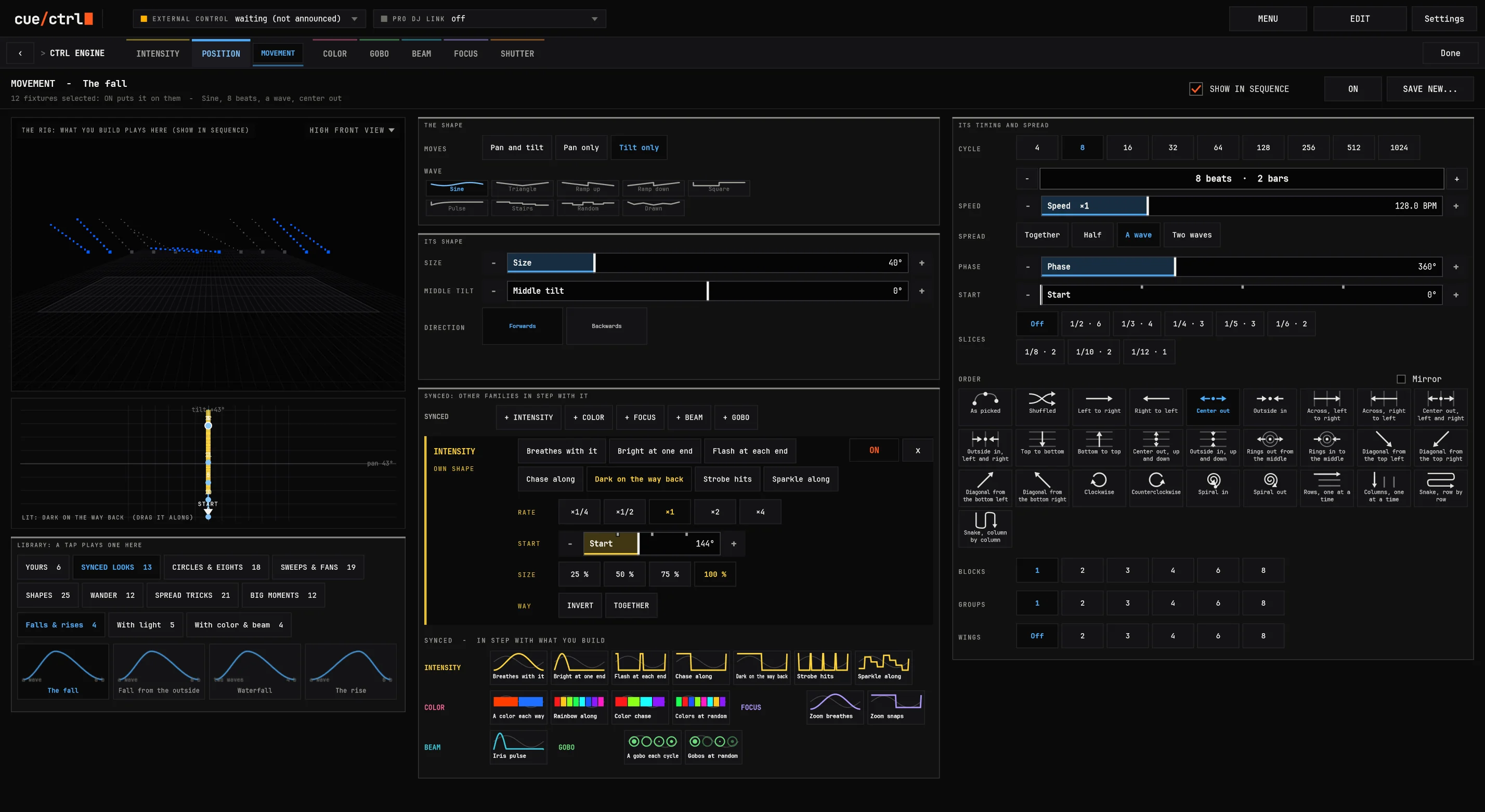
The fall, in one tap.
A look a designer builds over an hour, ready: each beam comes on up and out, falls to the floor and goes dark, climbs back in black, mirrored from the middle.
13 synced looks: the fall, from the outside, the waterfall, the rise; with light; with color and beam
Families in step: the dimmer locked to the movement, dark on the way back, any family on its own shape
START at any degree, for the look and for each family that follows it
Every engine shows the same: ON, UPDATE and SHOW IN SEQUENCE in one place
03 CONTROLS
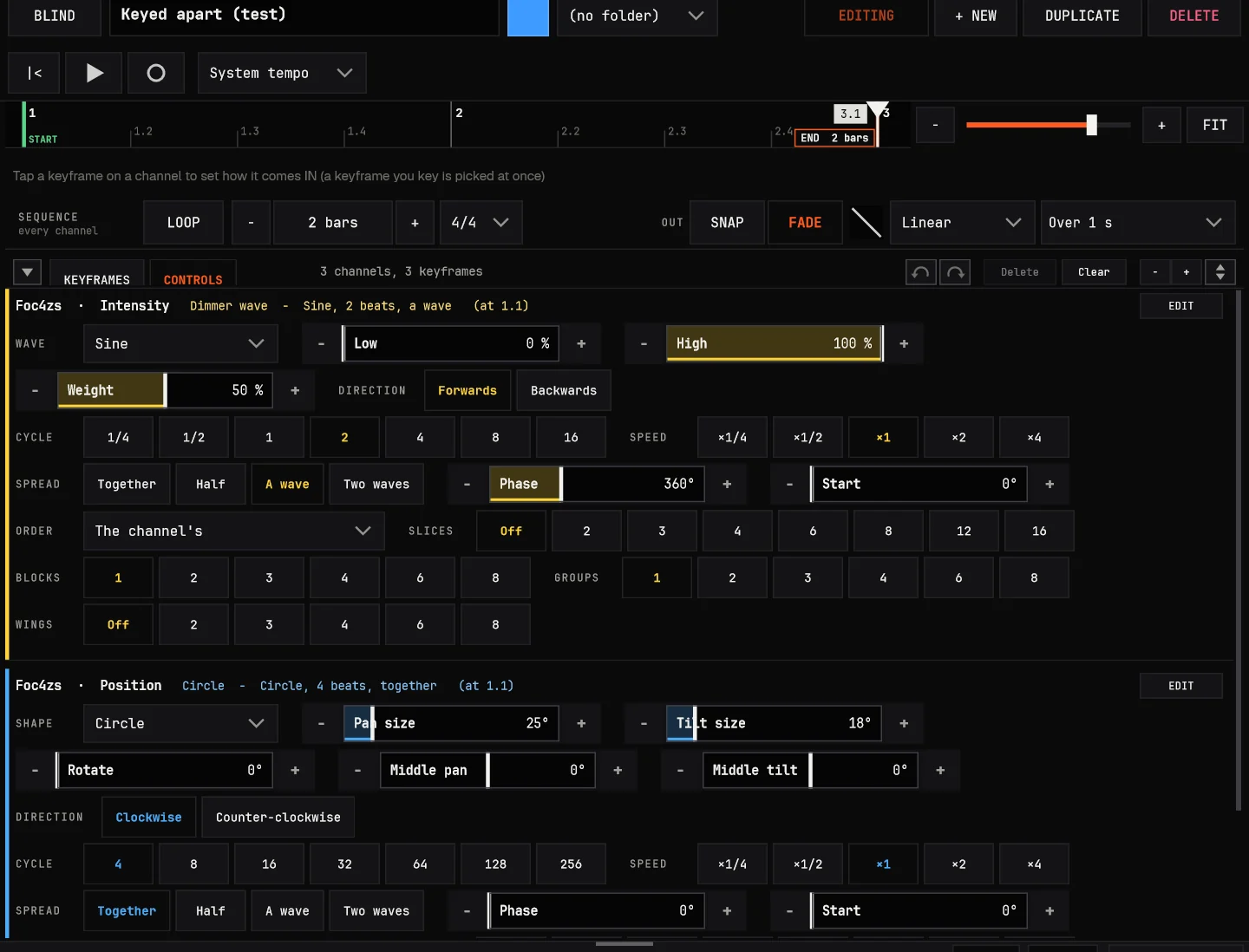
A keyframe's effect, as its own controls.
KEYFRAMES or CONTROLS: the same sequence, its channels as a timeline or each effect at the playhead with every control its engine has.
Its shape, its timing, its spread: a shape or a wave, sizes, middle, cycle, speed, spread, START, order, slices, blocks, groups, wings; change it while it plays
Named by what it is: "Dimmer wave - Sine, 2 beats, a wave"; a one-shot's pattern and run, a pixel pattern's motion and modulation
Synced stays synced: the looks following it keep its new cycle; EDIT opens its whole engine
Sized like KEYFRAMES: FIXTURES takes the rest; REPEAT a keyframe to the end on its right-click
03 EFFECT
An effect on any function.
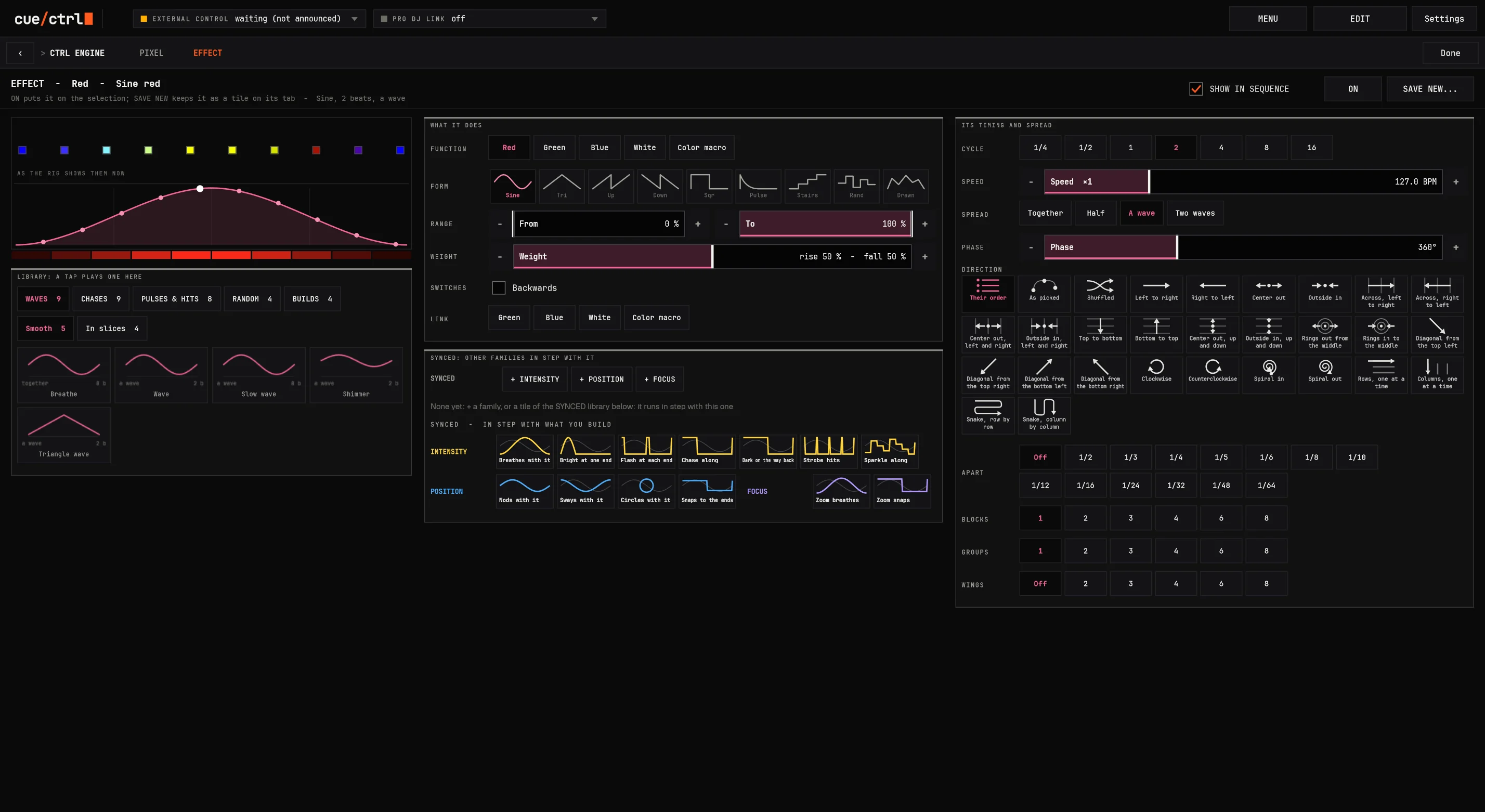
FUNCTION, FORM, RANGE: sine, triangle, saw, square, pulse, steps, random, or a wave you draw (8 to 32 points)
CYCLE, SPEED, PHASE, 28 directions by the layout, BLOCKS, GROUPS, CELLS
WEIGHT on every wave; LINK Red with Green and Blue: together, spread, opposite
MATCH another effect's timing: in step, a quarter after, opposite, half or double speed
Drawn in the fixtures' real colors, playing live on the selection
03 SYNCED
One tap. Locked in step.
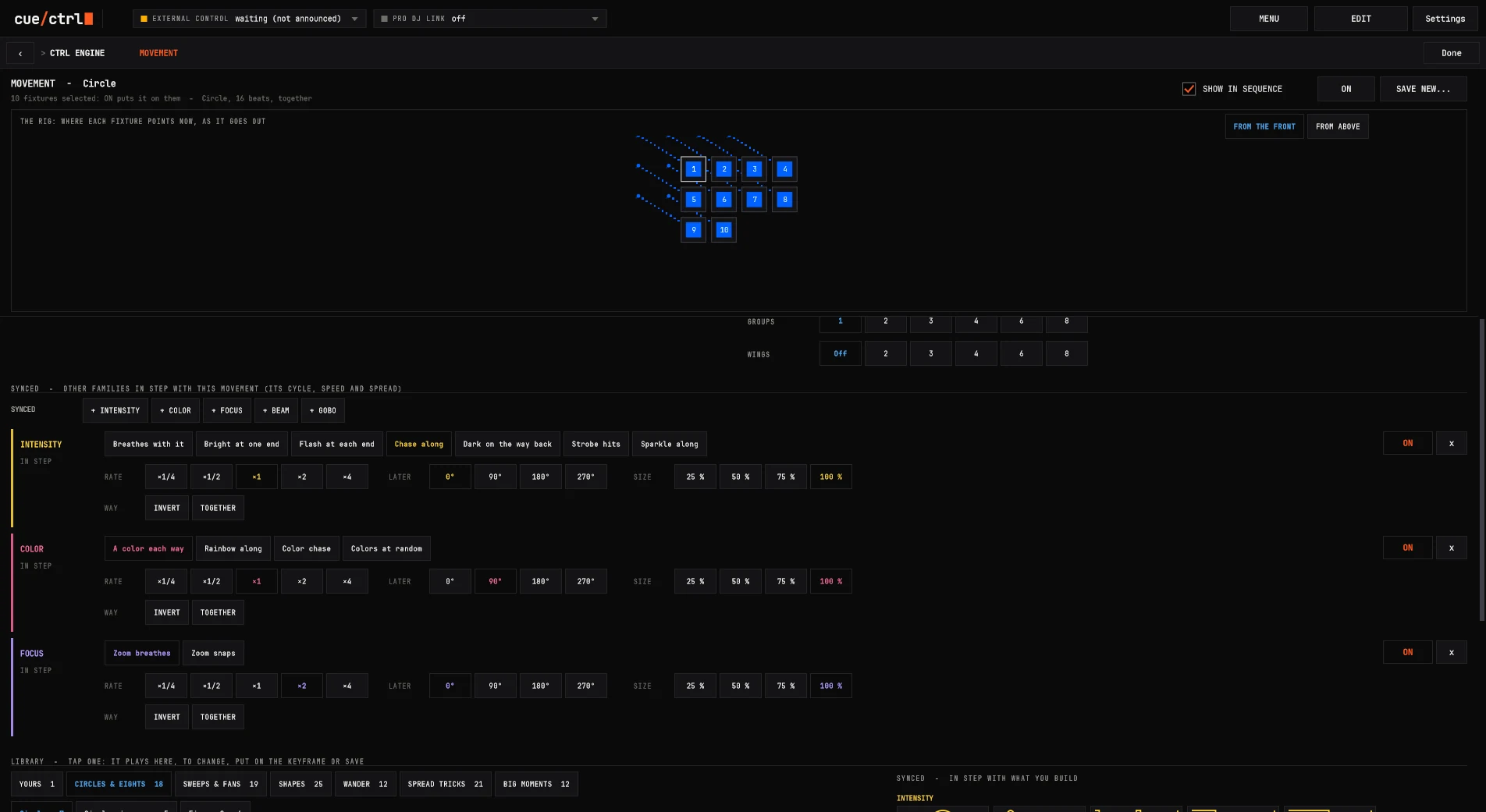
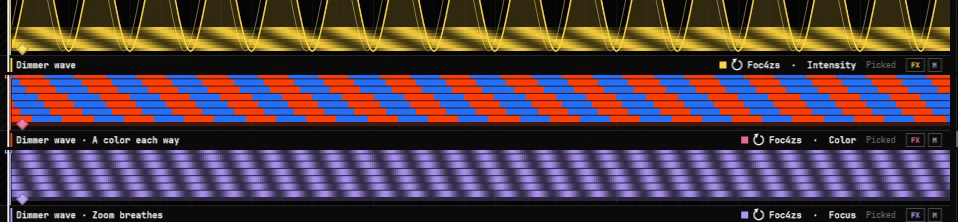
Build a movement, then + INTENSITY: a dimmer chase runs on the movement's own clock, fixture by fixture. + COLOR flips on each sweep. + FOCUS breathes with the circle. The looks lighting designers build by hand, in a tap.
In every builder: movement, one-shot, pixel, effect; only the families your fixtures have
20 ready relations: flash at each end, dark on the way back, a color each way, nods with it, a gobo each cycle...
Variations: RATE a quarter to four times, LATER by a quarter turn, SIZE, STEPS, INVERT, TOGETHER
Kept with it: saved, keyed, put on the selection, picked again: the followers come along
Keyed beside it, in step
03 Playing a show
Snap and release, the way you mean them.
GO
Does what its keys say: SNAP is there at once, FADE over its length, release over its Release. GO again lets the pass playing finish while another starts.
FLASH
Over everything while held, and it clears what it covers, so the hit reads every time.
SWAP
While on, every channel that sequence has is its alone: snapped, held or toggled, its channels or all intensity.
TOGGLE, PAUSE, STOP
On every row, every fader, every key. Up to 16 sequences at once by priority.
Release, your way
A release time per sequence, protected from RELEASE ALL, let go when covered, looping from its last look into its first with no dip.
Takeover
A sequence takes over fixture by fixture as it reaches them; channels let go with another; one-shots hand over cell by cell.
03 Deep dive
Over 340 looks in the builders' libraries.
107
Movement
circles and eights, sweeps and fans, shapes, wander, spread tricks, big moments
95
One-shot
on and off, sweeps, wipes and builds, chases, hits and strobes, fields
65
Pixel on color
plus 35 on intensity: pixel chases of dimmers
34
Effect on a level
plus 8 for colors and 5 for a wheel
28
Orders
the same menu everywhere an order is chosen
The libraries read your selection
Each pattern turned to how your fixtures sit: a column gets "down the column", a row "along the row". Patterns that would light everything at once are set aside, the ones made for this shape come first: FOR THESE.
Your own, in your order
Your tiles three across with type icons, favorites on top, sorts remembered. Right-click any control: set as the default. SAVE NEW makes a variation, UPDATE keeps it everywhere it's used.
Colors from fixtures
A color that follows another fixture's live color, with a per-type MATCH (hue, saturation, brightness) for the wheel whose "blue" is purple.
Cells everywhere
CELLS on every builder: AUTO, WHOLE (one light), EACH (cell by cell in their real places), ALL CELLS (a wall of bars as one matrix).
03 Deep dive
FIXTURES: every box a live fixture.
Its lamp in its color at its level, its gobo, where it points (pan and tilt in degrees), its number in the order (L and R mirrored)
Family flags on each box: solid where set here, open where keyed elsewhere
Zoom from 4 % pixels to 300 % and pan, never scroll; FIT stays fitted
Menus on a picked box act on all: sort by layout, number, address or name; save as a group; arrange in rows, grids, mirrored
HIGHLIGHT in white or the color that stands out, LOWLIGHT the rest, BACK and NEXT one at a time
CLEAR precisely: what, only, when, with one undo
Live at 30, 15 or 5 a second, only changed boxes drawn: 1,387 fixtures for 8 % of one core
LOAD, following the tab
04 Time
Every engine on the beat. One-to-one.
Beats are the unit everywhere: fades, delays, effects, one-shots, phasers, chases, loops. Follow the DJs, a band's timecode, a tap, or a tempo of its own. Change it and every engine stays locked, gliding to the new tempo, never jumping.
Tap the tempo yourself: the twelve fixtures keep three chases in step (a bar, two bars, four bars) from one clock.
04 The tempo system
Any clock in the room, followed.
The DJs
The system tempo follows the deck in the mix, pitch and all, and changes hands with the crossfader.
Timecode
A band's MTC or LTC: the show's songs at their timecodes, their tempo with them.
TAP
On screen, or any MIDI button or fader learned for TAP or for the BPM itself.
Speed masters
Eight of them on executors, 20 to 300 BPM, tapped, for the sequences that follow them.
Its own
A sequence on its own BPM, tapped, or in seconds when beats aren't the point.
The Tempo trigger
To a BPM, x0.5 to x2, a few BPM more: gliding, and back when let go. Hold a FLASH and the whole show runs faster.
Each sequence's speed from x1/4 to x4 on top. One clock, measured to the millisecond, drives every engine: base looks, effects, one-shots, pixels, captured video, keyframes.
04 Organizing a show
Sequences, not cue directories.
Big consoles file looks as numbered cues in numbered lists in numbered directories, and you remember where. cue/ctrl keeps sequences in folders you name, in your order, each one saying what it is.
Folders in folders, dragged into your order; favorites on top; renamed in place
Each row says what it drives ("SPOTS x12") and what it sets: the family squares, FX, its stack word, its length
GO, FLASH, SWAP, STOP and EDIT on every row; a folder counts what plays inside it
A sequence is a look or a timeline: 0 bars is a look, 8 bars a drop, a loop per channel
THIS SEQUENCE: the open one as a list of channels and keyframes, tap to go there
The library
04 Keyframes
Draw what you see. Drag what you feel.
A drop, 8 bars, 17 keyframes
Keyed at the white bar: tap a look, it's keyed and picked; tap another to swap it and try looks one after another
Each effect drawn as it plays: a color effect as its band, a strobe as its pulses, a movement as its shape
A fade handle and a delay diamond on every block, dragged in eighth beats ("F 2", "D 0.5")
IN and OUT: SNAP or FADE, seven curves, how it leaves; no fixed fade times
Loops per channel: a 1-bar color loop under a 4-bar dimmer chase
REC as it plays, BLIND in a red frame, copy and paste across songs and sequences on the same beats
04 Keyframes
Longer, shorter, later: just drag it.
The color lane's fade from Red to Blue being dragged longer and shorter while the rig follows, with a fan of delays across its sixteen fixtures. No fade-time field to type, no cue to re-record.
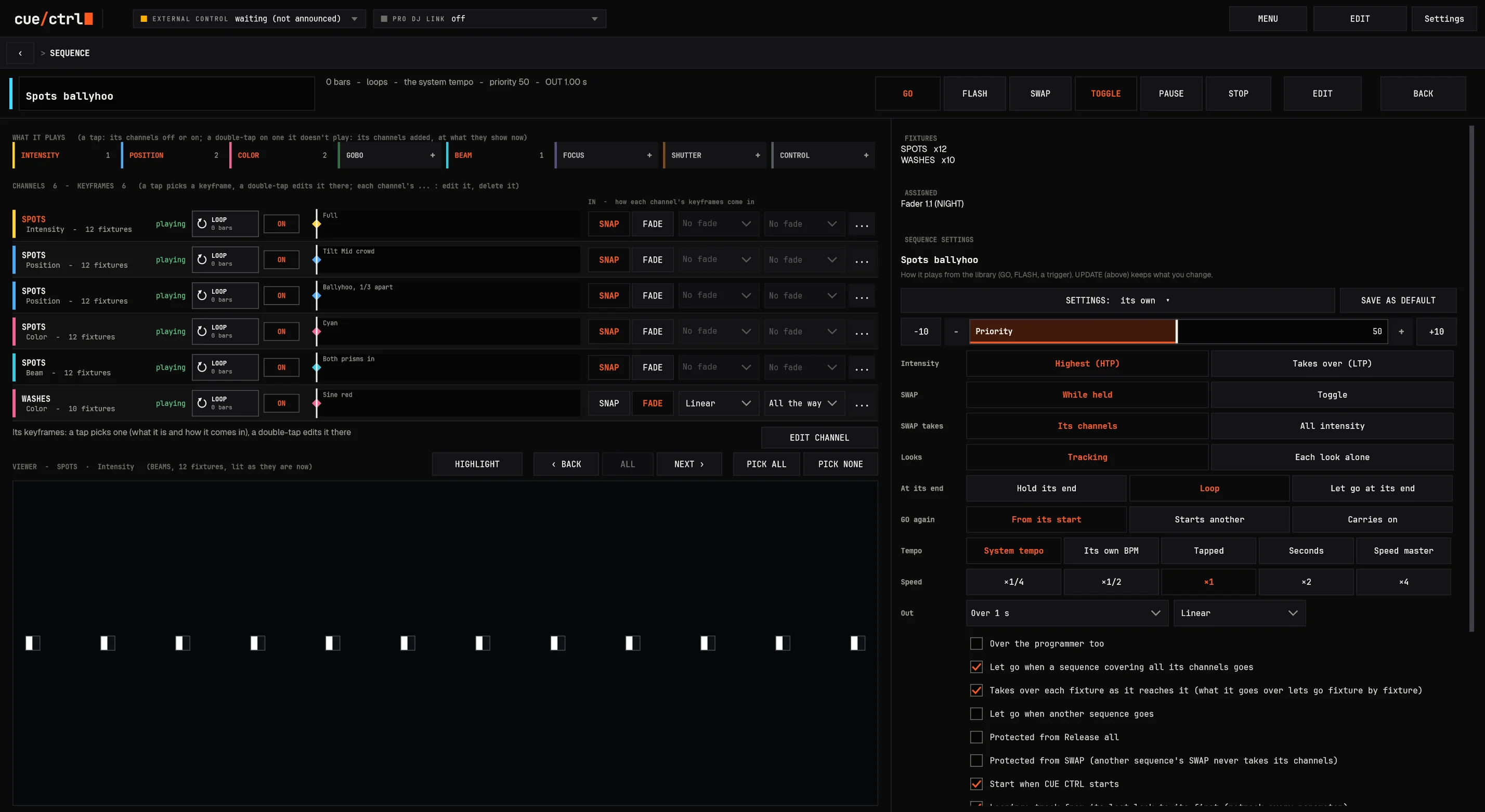
04 THE SEQUENCE PAGE
Everything a sequence is, on one tap.
GO, FLASH, SWAP, TOGGLE, PAUSE, STOP
WHAT IT PLAYS: its families on and off
Every channel with its keyframes along time
THE VIEWER: its fixtures lit as the rig shows them, HIGHLIGHT, BACK, NEXT, PICK
ASSIGNED: the faders, keys, notes, stacks and triggers holding it
All its settings, then UPDATE or CANCEL
04 Internal triggers
Anything can trigger anything.
1. Anything on any button
Every one of the app's 70-odd functions, and every sequence, executor, preset, group, layout and fixture of the show, goes on any button, fader, key or knob: a MIDI controller, an X-keys key, an OSC address, a console's DMX channel, a piece of your PANEL. A right-click on anything: ASSIGN.
GO, TOGGLE, FLASH, SWAP, RELEASE, PAUSE, a fader, a speed, TAP; the grand master, BLACKOUT, FREEZE, a page, a tab, a layout, the CTRL ENGINE, Settings.
2. A sequence of sequences
A sequence can be a list of other sequences: each GO plays the next one in order (NEXT 2/5 on its row), a shuffled one (each once before any repeats), a random one, or all of them. Each can follow by itself after so many beats or seconds, and let go of the one before.
GO from a folder: a folder of looks becomes a playlist, in order, shuffled or at random.
3. Every moment a trigger
A sequence does things when it goes, at a beat, at its end, when it's let go, or at a time of day or a timecode: GO or let go of others, set the grand master over a time, change the tempo, turn a page, send MIDI, DMX, OSC or a keystroke, or run any function.
Open Settings when a sequence runs? Put it on its GO. Blackout at the end of an intro, the next look a bar later, the tempo halved for a breakdown: the sequence does it.
Against the usual way: a console's macros mostly press its own keys in order, on a short list of what they can reach (on one, mostly playbacks; on another, MIDI and OSC only once its hardware is bought); here a trigger is a choice from the same list as everything else, with its timing in beats.
Scheduled: GO, TOGGLE, RELEASE or PAUSE at a time of day (on days, on dates), at a timecode in (LTC or MTC), at the LIVE show's timecode or cue/ctrl's own generator; fired once as the clock passes, never on a locate.
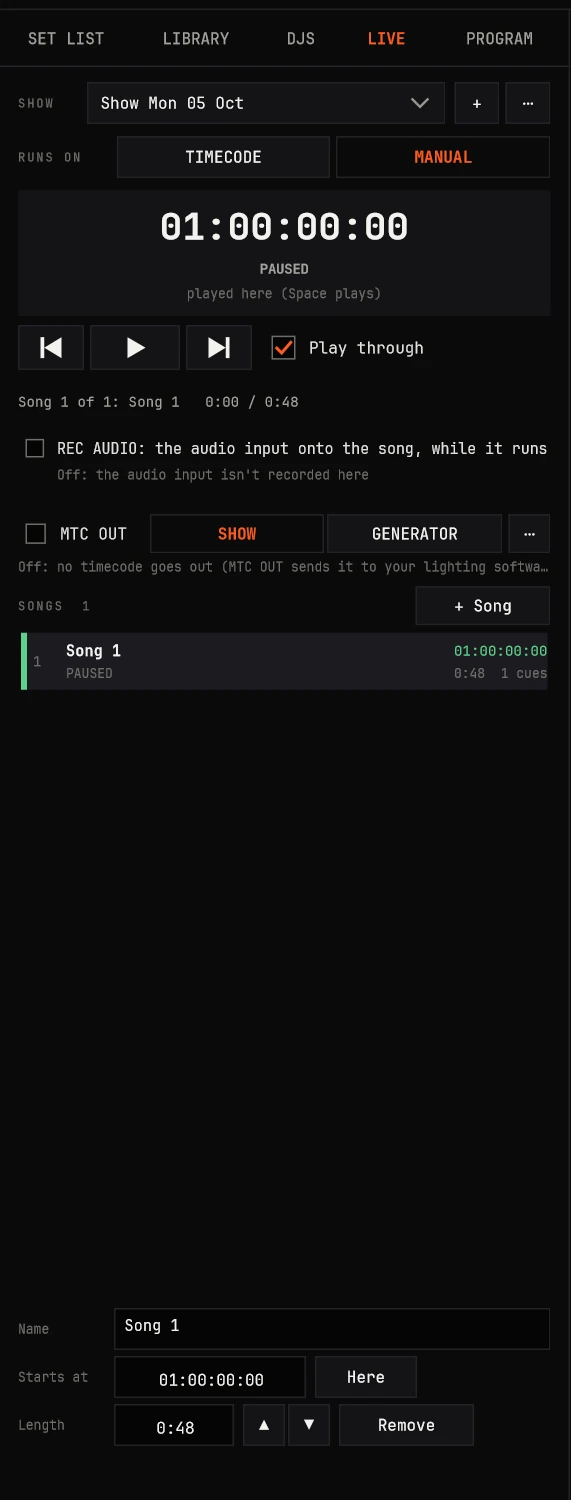
04 LIVE
Timecode, the easy way.
For bands and shows on a clock: cue/ctrl reads the band's timecode, or runs the clock itself, and every song's lights sit on it. Drag a sequence into place, nudge it in frames, play it through. No rehearsal spent re-recording a timeline in real time.
MTC or LTC in, any level, either polarity, even backwards; 24, 25, 29.97 drop and 30; offset, freewheel
TIMECODE or MANUAL: the band's rig runs it, or rehearse and play through
REC, REC DMX, REC AUDIO on the LIVE deck: a song made where the timecode is
cue/ctrl as the audio host: each song's file or recorded audio, leading the clock
MIDI Show Control runs it: GO 3, STOP, RESUME, RESET, LOAD, TIMED GO
TIMECODE OUT: MTC to your console (the show's clock, or the band's LTC as MTC), or the GENERATOR; LTC out at a level
LIVE
04 Deep dive
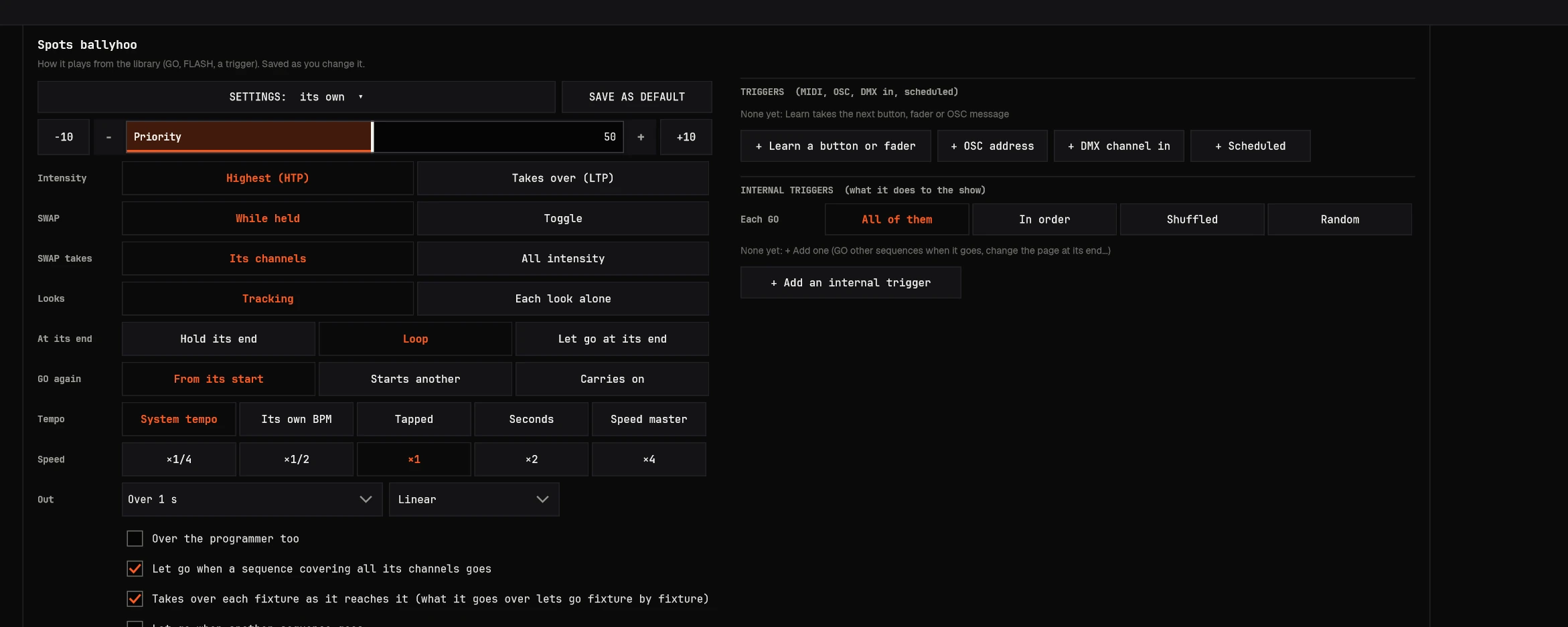
Every setting a sequence has.
Priority 1-100, over the programmer too
Intensity HTP or swapped; looks tracking or alone
At its end: hold, loop or let go; GO again from its start, starts another, or carries on
Tempo: the system's, its own BPM, tapped, seconds or a speed master; speed x1/4 to x4
Release time, protected from RELEASE ALL and from SWAP
Start when cue/ctrl starts; loops track from their last look to their first
Mark: a fixture moves in black before it's seen
Settings presets and SAVE AS DEFAULT
Sequence settings
05 Control surfaces · CONTROLLERS > FADERS
Faders that feel right.
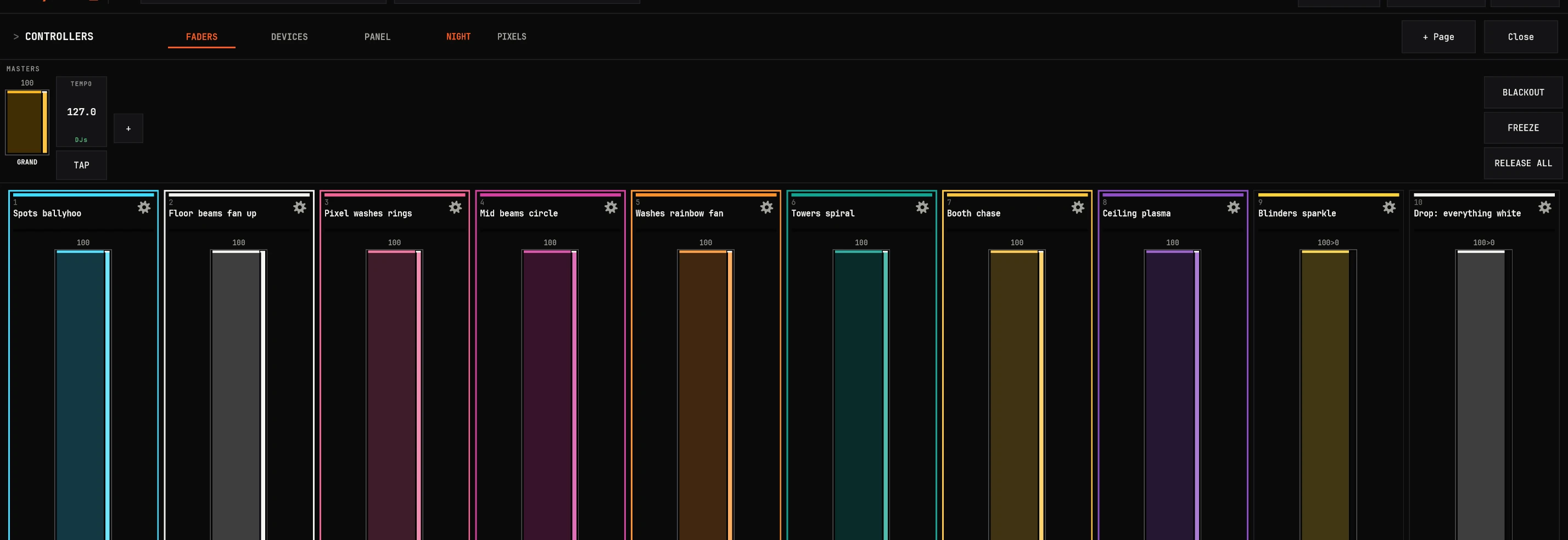
A real club's page: executors 1-3 and the limiters as the founder's show has them (JOLT ON, the system tempo, GOGO; 4Z, LED, GOGO), executors 4-10 that show's other sequences. Drawn as cue/ctrl draws it and playing by its rules: use any fader or button.
01 / 16
Your page
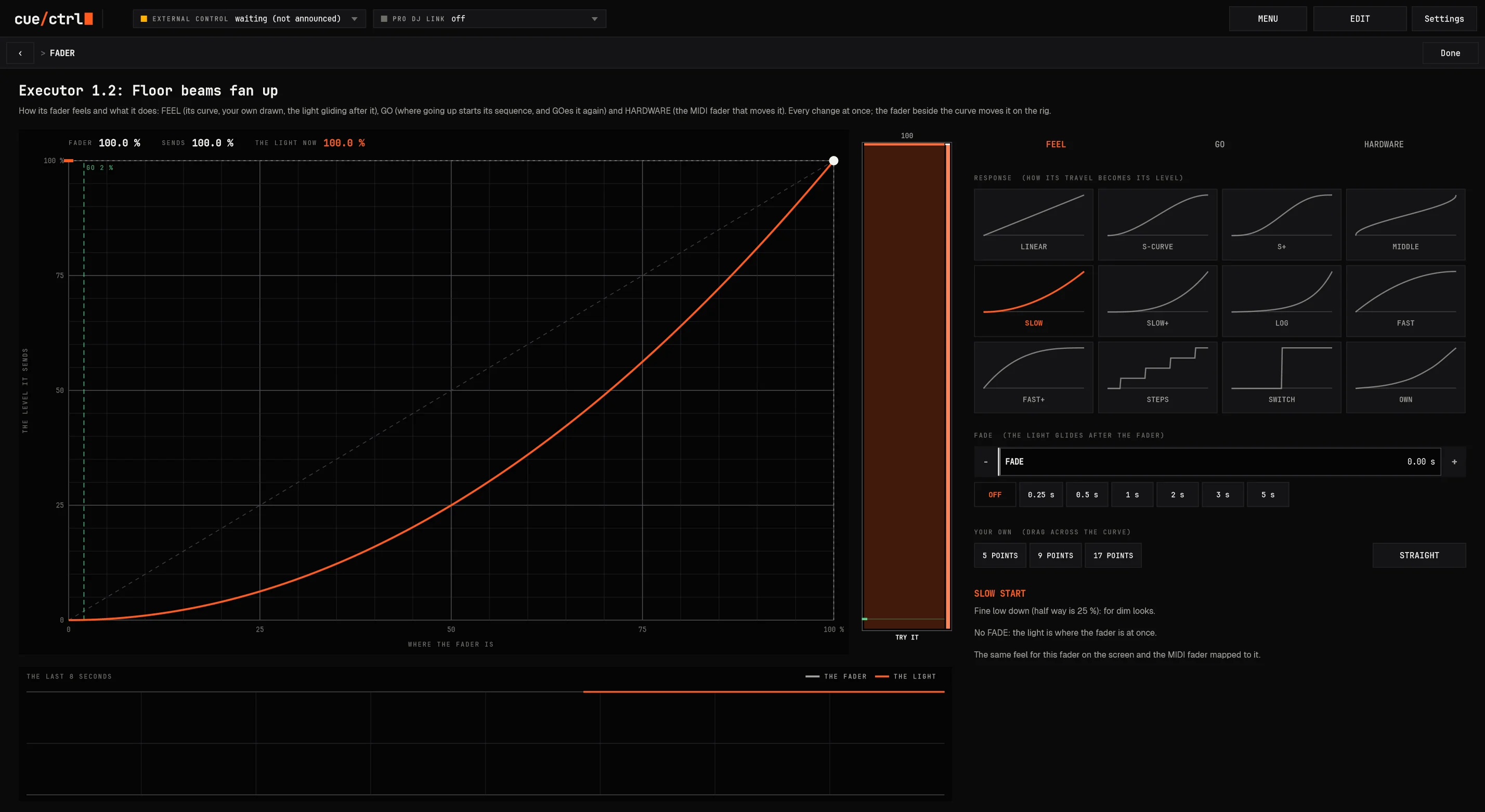
05 THE FADER PAGE
Right-click any fader: its feel, its curve, its hardware.
05 FADERS
Anything on a fader.
Page 1: NIGHT
Pages of ten
Faders and buttons, override executors, speed masters 1-8, each absolute or relative.
Anything on one
A sequence, a stack, a limiter, a scaler, the grand master, the system tempo, any function.
Limiters and scalers
A limiter is a fader's top: 75 % at the top, and every bit of travel still used.
Stacks up one fader
Sequences crossfaded, snapped, built or timed up its travel, level macros, NEXT and BACK, their own design page.
05 DEVICES
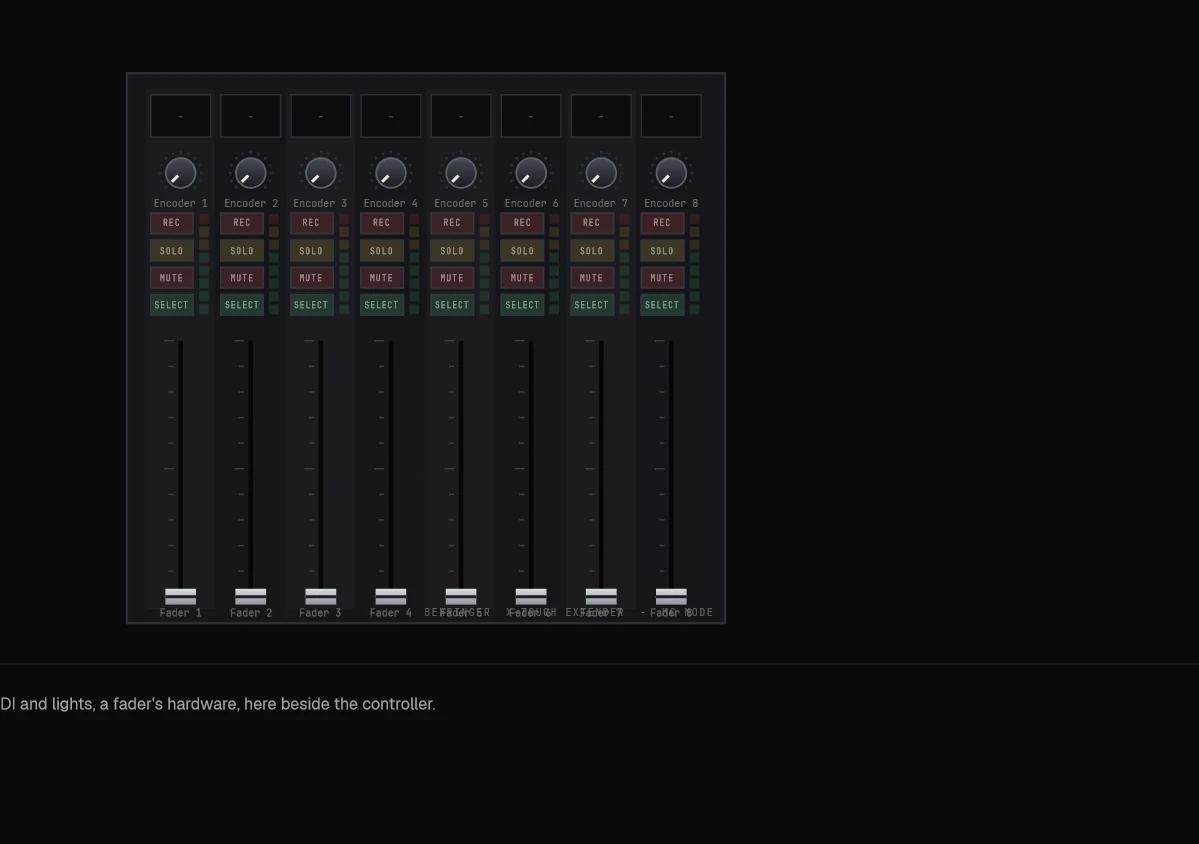
Any controller, drawn and talking back.
Every controller the computer sees, drawn like the hardware: screens, rings, lit buttons, motor faders, meters. Program it before it's even plugged in.
Built in: Behringer X-Touch family, BCF2000, BCR2000, Mackie Control, Akai APC mini, Novation Launchpads, Korg nanoKONTROL2, Elation and ADJ MIDIcons
Anything else: LEARN ITS LAYOUT, touch its controls and drag them where they sit
Talk-back: motors follow, lights flash when paused, rings show levels, scribble strips show names and values in color
Per device: what's assigned on a device runs only from that device; profiles to switch
An X-Touch Extender, drawn
05 X-keys
X-keys, native. Every key anything.
Read directly: no driver chain, no MIDI hop; a key can GO a sequence, send DMX, MIDI or OSC, open a setting
Keys that do things in turn: ALL, IN ORDER, SHUFFLED or RANDOM: ten sequences on one key
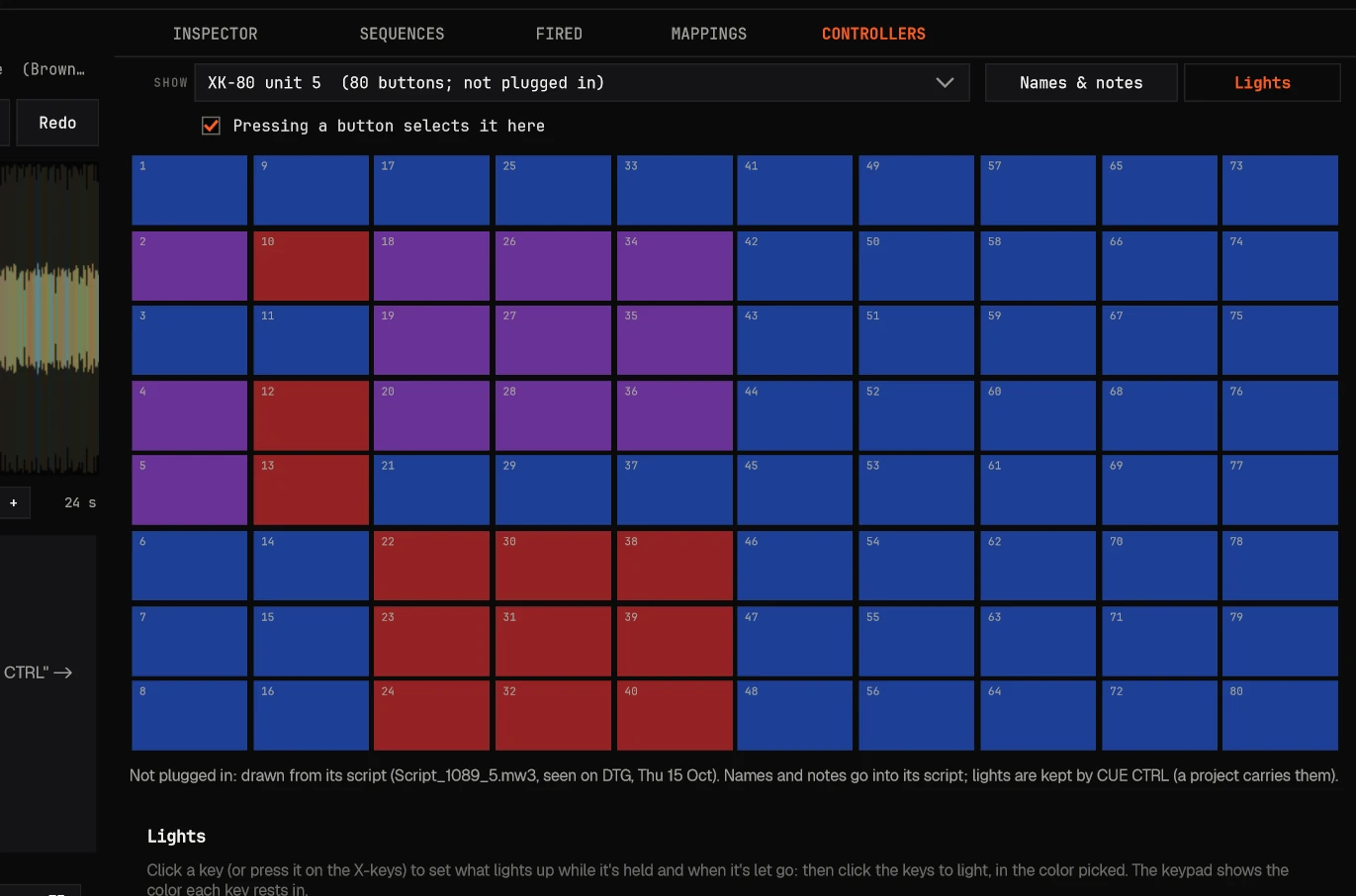
Backlights set by cue/ctrl: blue, red or both; while held or when let go; other keys lit by one press
Color effects across the pad: sweeps, wipes, ripples, random strobe, pulses, at a speed and density
Recorded with their own clock, fast taps keeping their spacing, even alongside other software
Tap a key on the pad: a ripple from it.
An XK-80 in cue/ctrl
05 PANEL
Design your own touch surface.
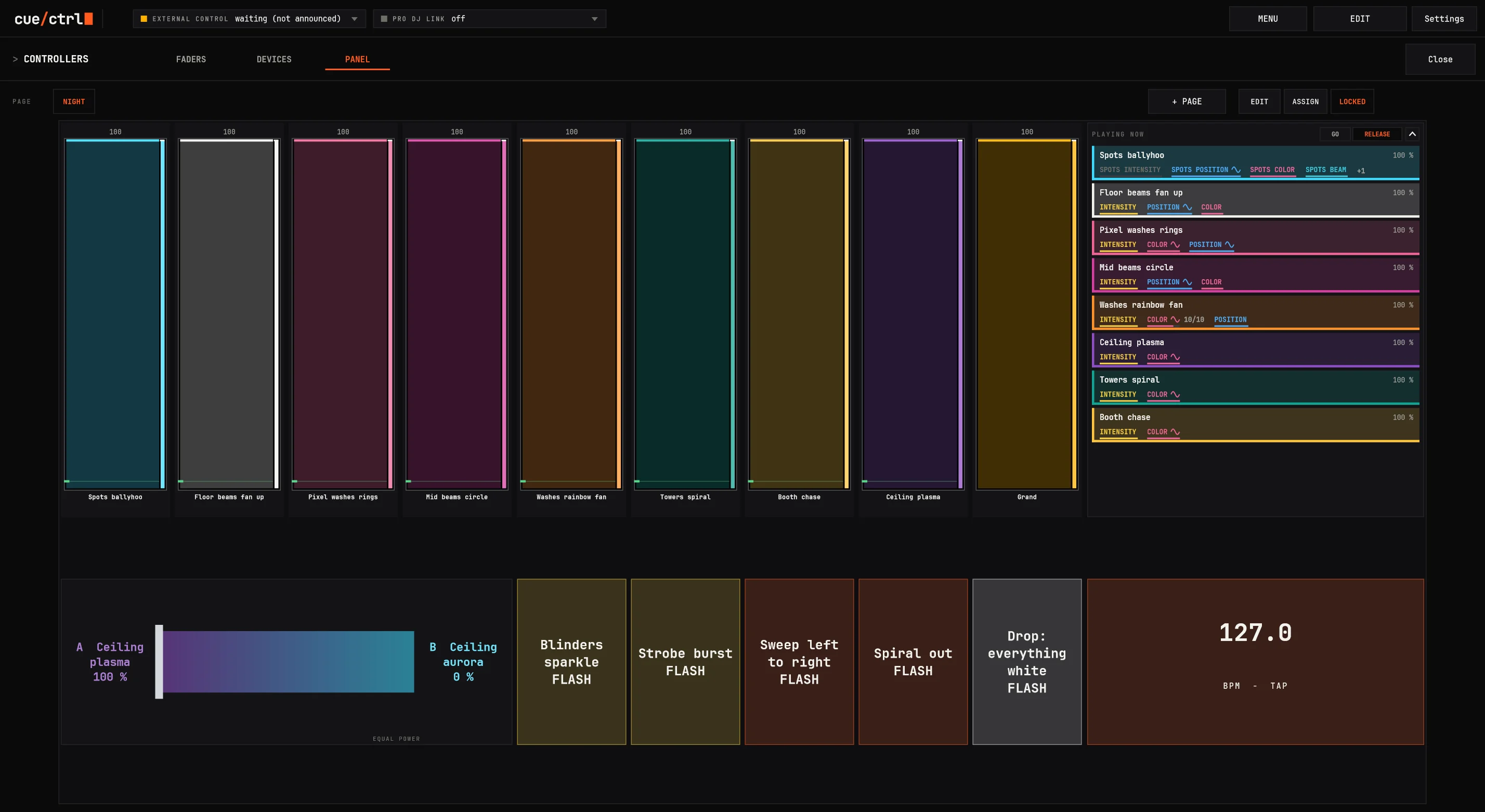
Pages of a grid you fill by dragging: buttons, faders, rotaries, XY pads, crossfaders between two sequences, labels, lamps, meters, the list of what's playing, TEMPO, frames, the grand master.
ASSIGN each piece: as its function, momentary, toggle, on, off; range, curve, steps, fade, spring back
Its colors at rest, on and held; LIT AS fill, border, words or glow; words with {name}, {value}, {state}
Crossfaders and XY pads blend sequences: intensity added, shared channels moving smoothly, both effects running
Meters on anything: a group's output, a fixture, the rig, the beat
COMBO FADERS: the FADERS page's fader with its GO, FLASH, SWAP, PAUSE and STOP, one feel for both
Buttons designed: 12 ready looks, gradients, glass, outline, neon, a picture of your own
05 PROGRAM PANEL
Everything live, where the keyframes go.
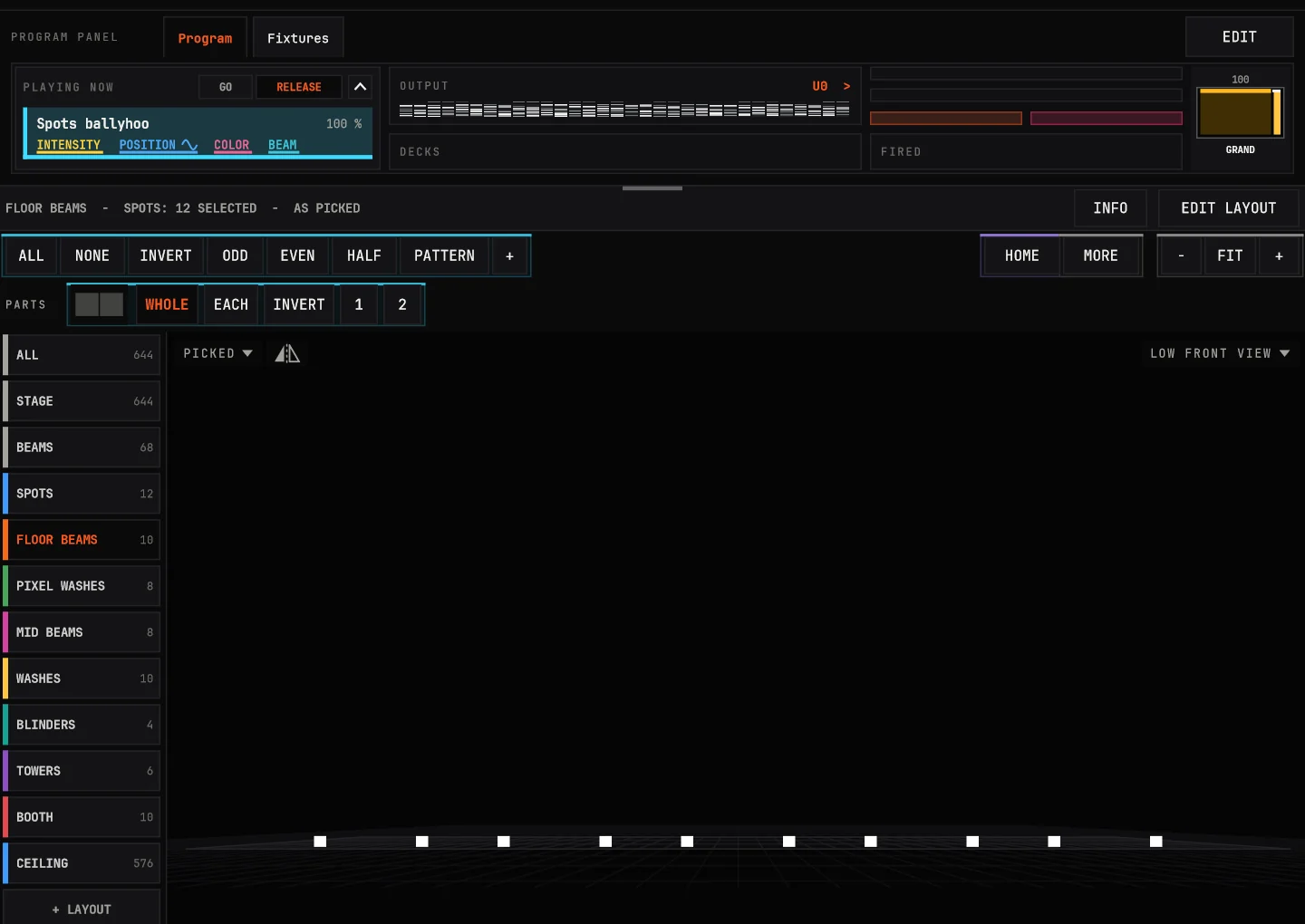
With no sequence open, PROGRAM's middle is a panel of your own, from the top: what's playing, what goes out, the timecode, the decks, the masters. EDIT to lay it out; it locks again.
PLAYING NOW, the light each sequence really puts out, releases falling over their OUT
OUTPUT a universe's 512 channels, TIMECODE coming in, DECKS armed or why not
FIRED, the CLOCK, the SELECTION, faders and buttons as PANEL's
FIXTURES: every fixture patched, found by number, range, address or type; tap one to program it, drag them onto the layout
05 ASSIGN
Right-click anything: Assign.
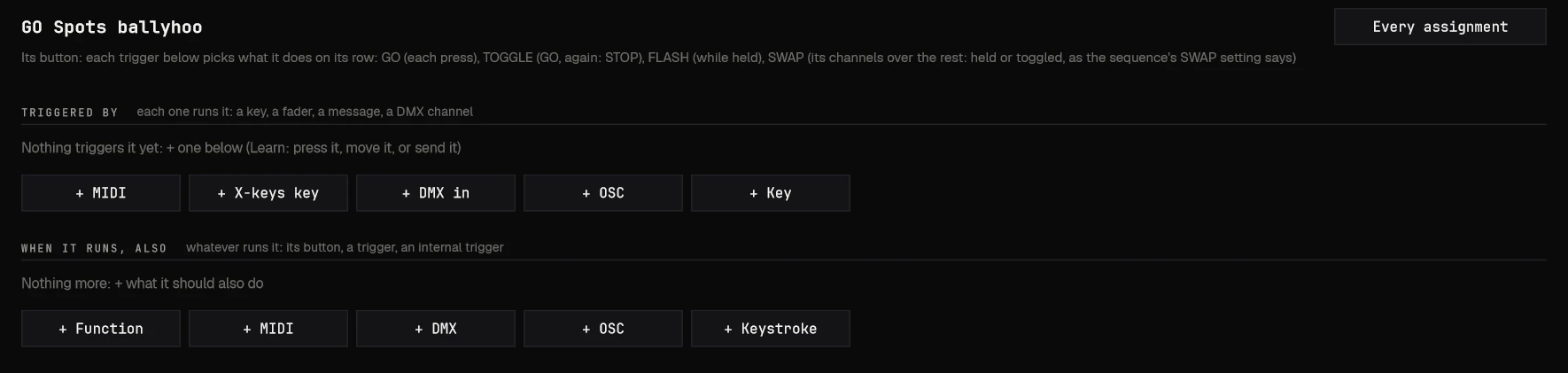
Any button, preset, group, layout, fixture, executor or sequence can be run from MIDI, an X-keys key, DMX in, OSC or a key on the keyboard. And anything, when it runs, can also send MIDI, DMX, OSC or a keystroke.
GO Spots ballyhoo
In
MIDI notes and CCs, X-keys, DMX channels from any console, OSC addresses, the keyboard.
Out
MIDI, DMX by patch ("Spot 1 Pan", a wheel's slot), OSC (a desk's playbacks, a video server's clips), keystrokes.
Touch and headsets
Touch screens, pens, a Quest 3 in a virtual desktop: taps on release, two-finger right-click, menus made for fingers.
06 Built for the show
Opens in under a second. Fires to the millisecond.
0
From launch to ready
A real club's show: 856 songs, 53,557 cues, 1,388 fixtures. Measured.
0
The cue clock
Its own thread, checking every deck; 0.002 ms of work a tick.
0
Of one core
The whole app at rest with a real club's show; 19.5 % drawing all 1,387 fixtures live.
0
Checks every build
Automated tests on the engines, the merge, the fades, the files.
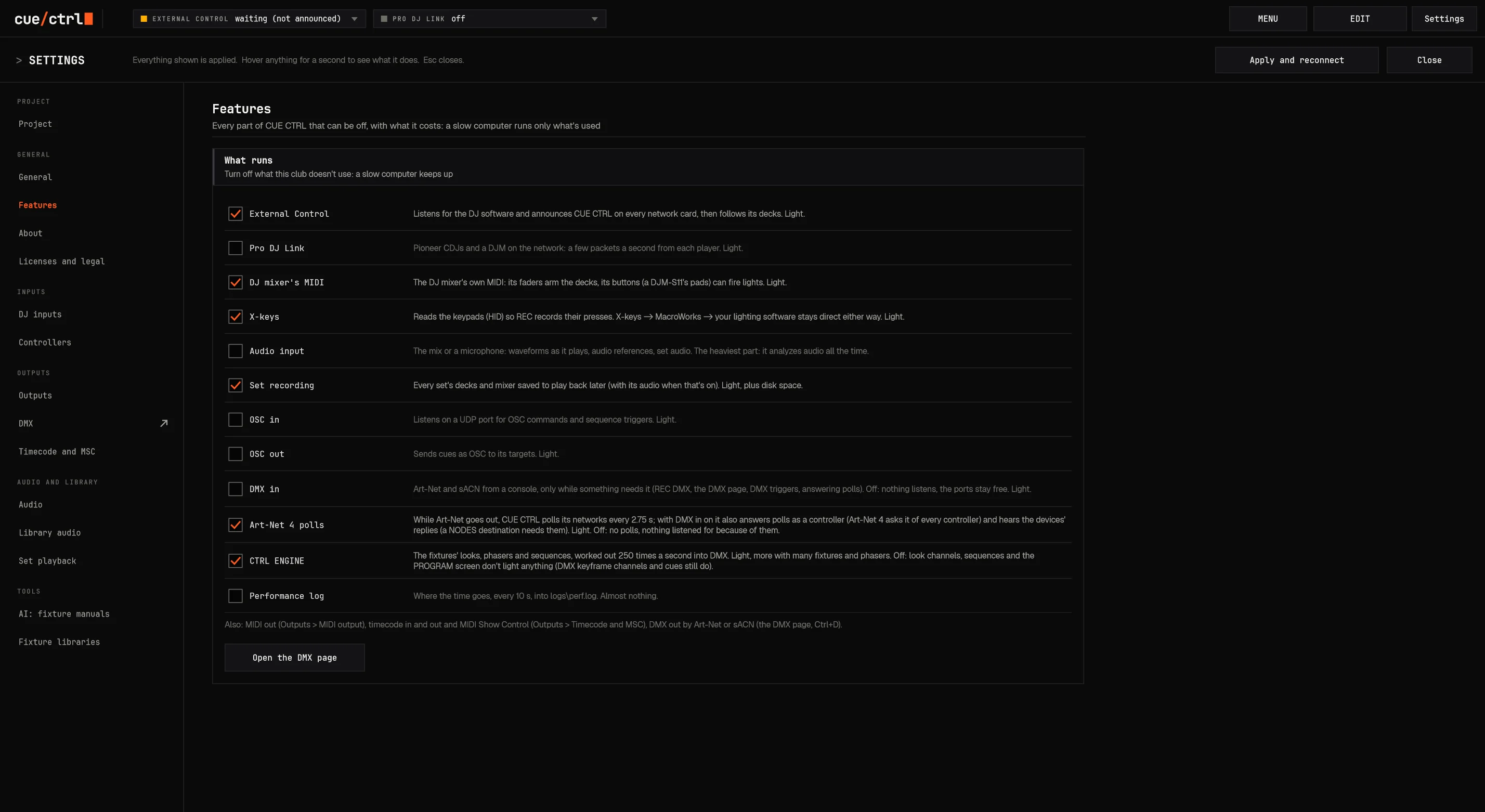
Native C++17, no browser inside, no runtime to start. Full speed behind other windows (the system is asked not to throttle it); every all-night feature has an off switch and says what it costs.
06 Safety
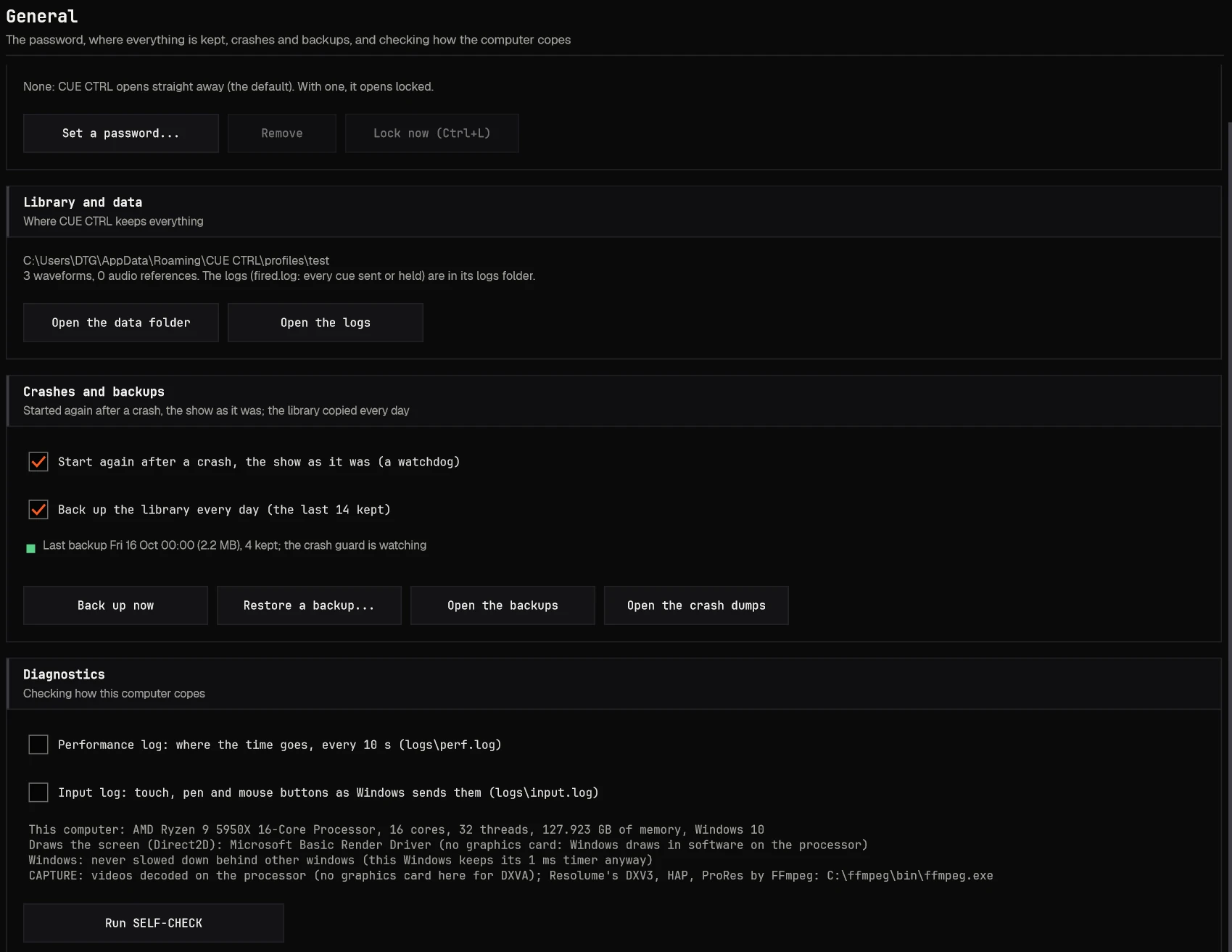
If the computer falls, the show gets back up.
Back in about a second, with the show: the sequences running, in time with their beat; masters, the grand master, blackout, the executors' page, DMX out
A watchdog beside it; crash reports kept; at most three restarts in ten minutes
A copy of the library every day (the last 14), and before every upgrade or project load
The password lock keeps the club PC safe while everything keeps running underneath
SELF-CHECK: everything it can check about itself, problems first, before doors
Logs that explain: everything that fired or was held, and why
Settings, General
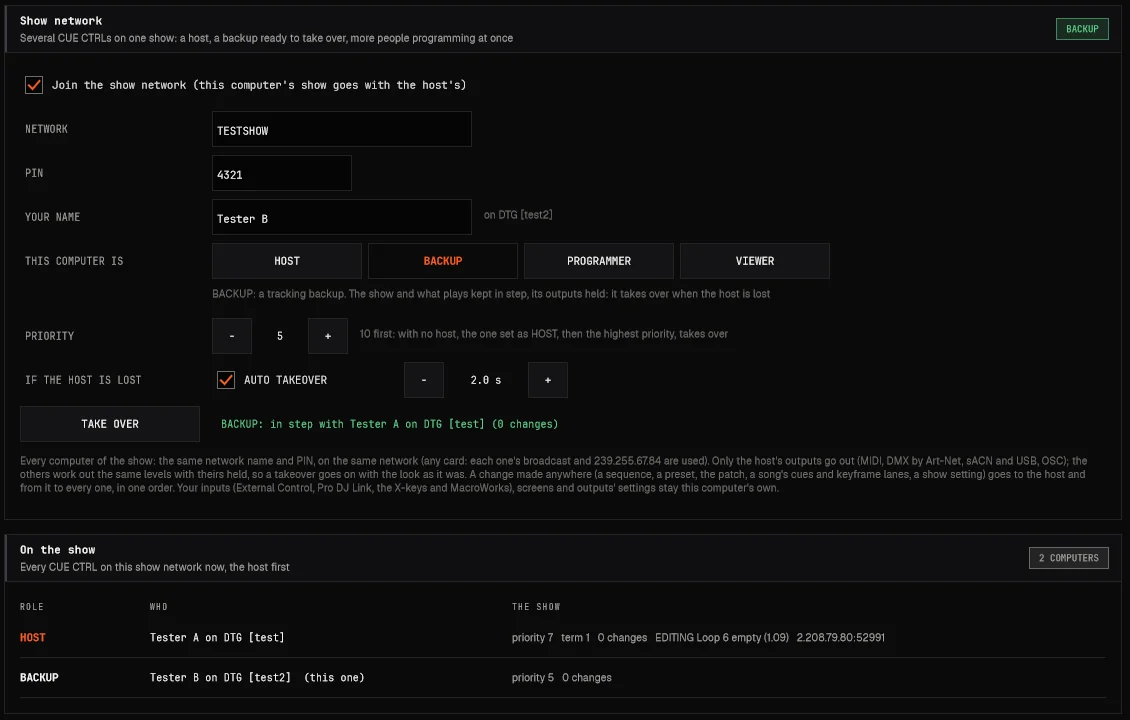
06 SHOW NETWORK
Several computers. One show. A backup that takes over.
HOST: the show's home; only its outputs reach the stage
BACKUP: plays the same show in step, its outputs held; the host lost, it takes over in a tenth of a second with the look as it was
PROGRAMMERS at once: every change goes through the host to everyone, in one order; a sequence open on one says EDITING BY there
A name and a PIN, any network card; priorities decide who hosts; TAKE OVER by hand
Joining: the host's show in a second, yours kept aside
06 No limits
0
universes. Not one of them for sale.
Art-Net and sACN out, U0 to U32767, to as many destinations and network cards as you have. Unlimited mapping, unlimited connectivity to anything with an IP address. No dongle, no output box, no license per universe.
06 Networks
Found by themselves. Sent where they belong.
Every network card at once: Ethernet, USB, Wi-Fi, virtual; checked every 2 seconds; the right one remembered
Art-Net 4 as a controller: polls, replies, each universe straight to the nodes that take it
sACN on several cards with a priority
Light on the network: at most 44 packets a second a universe, once a second when still
Visualizers found: every 3D visualizer on the computer, whether it hears cue/ctrl, and the fix if it doesn't
Self-tests: the firewall, reserved ports, every port at start, with the fix in words
DMX out off means no DMX work at all: a DJ night on a house console costs nothing
AT A GLANCE: every way in and out with its state, and a clash said in words: another computer sending your universes
06 Privacy
Your show stays yours. Offline is normal.
0
Telemetry
Nothing about your show, your DJs or your computer is ever sent to SYNAP. No accounts, no update checks.
Static
Networks welcome
Show networks with no internet are the normal case: everything works on a closed booth network or a router-less link.
Asked
Internet only on request
Your AI provider for a manual, the fixture libraries: only when you ask, with your own keys sealed for your Windows user.
06 Deep dive
One file is the whole show.
Songs, cues, keyframes, sets, DJs, votes, audio references, waveforms and set recordings; the patch with its types, pictures, groups and layouts; every sequence, preset and effect; executors and masters; the controllers' names, mappings, assignments and all the X-keys programming.
Merge never wipes anything: the side edited last wins each thing, the replaced kept as a backup. Or Replace, with the old one put aside to bring back.
Each computer keeps its own setup: outputs, inputs, networks, devices, password, AI keys. Carry the show between computers; each keeps its wiring.
Features: every part that can be off, and what it costs while on.
06 Platforms
Windows and macOS. One code.
Windows 10 and 11
One installer
Installs over the old version and copies the library first; a firewall rule for every network type; nothing else to install.
macOS, Apple silicon and Intel
The same features
Its own two-way MIDI port (no loopback app), secrets in the Keychain, App Nap off so the clock never naps.
Written in modern C++ on a professional audio framework: native on both systems, not a web page in a wrapper.
07 Why us
The usual way, and ours.
The usual way
cue/ctrl
Output priced by the universe, unlocked by keys, wings and nodes
Unlimited Art-Net and sACN universes from your own computer
A syntax and a command line to learn before the first light moves
Tap the fixtures, tap a look: it's playing and it's keyed
Numbered cues in numbered lists in numbered directories
Named sequences in your folders, each saying what it drives
A group for every way you'll ever pick the rig
One group: odd, even, halves, patterns, 28 orders, mirrored
Timecode recorded in real time, fixed in lists
Timecode drawn on a timeline: drag it, nudge it in frames, play it through
DJ lighting that guesses from the audio
Your programming on the song, back for every DJ, every night
Pixel mapping in another program or a media server
A pixel engine and video capture inside, at a fraction of the CPU
Effects each with their own speed to set
Every engine one-to-one with one clock: the DJ, timecode, a tap
Their hardware, their surfaces
Any controller, drawn and talking back; X-keys native; your own touch PANEL
Minutes to open; after a crash, reload and rebuild by hand
Under a second to open; back in about a second with the show running
07 Questions, answered
No. If you can tap a fixture and tap a color, you can light a room tonight.
Everything deeper (timelines, effects, pixels, timecode) is there when you want it, in plain words, with tooltips on everything. Programmers who know the big consoles find the same ideas, without the syntax: priorities, tracking, HTP and LTP, executors, stacks.
Both, in one program.
It follows DJs like nothing else (decks, songs, sets, the mixer), and under that is a full lighting console: patch, presets, effects, pixel mapping, sequences, faders, timecode. Use one side, or both together.
All of them.
Art-Net and sACN, universe 0 to 32,767, to as many nodes and network cards as you have. There's no license per universe and no output box to buy.
A Windows or Mac computer.
Then any Art-Net or sACN node for DMX, and if you like, any MIDI controller, an X-keys pad, a touch screen, a tablet with OSC. None of it has to come from us.
Yes: run it beside your console, or let it drive it.
Capture your console's DMX onto songs with REC DMX, send it MIDI notes, OSC or MIDI Show Control on cue, give it timecode. Your console keeps its show; cue/ctrl adds what it can't do.
No.
It runs on closed, static show networks, which is how it should be. Nothing is sent home; the internet is used only when you ask (an AI manual reader, the fixture libraries).
Not by guessing, on purpose.
It finds the tempo and bar one of a song, the parts the DJs play, kicks and snares. The lights are yours: program the moment once (by hand, by recording what you play, or by capturing another console) and it comes back on that bar every time.
It learns it tonight.
The song is logged with its DJ and the part played; the booth's audio is recorded as its reference; you can REC on it live. Meanwhile your looks on faders, stacks and pads run the room as on any console.
Yes. That's where it started.
MTC or LTC in, songs at their timecodes, MIDI Show Control, the audio played by cue/ctrl itself, timecode out to other gear. Keyframes on a timeline you drag, not a show recorded in real time.
Built in.
A pixel engine with 81 patterns, modulations and palettes; any fixture's cells in their real shapes; and video capture: drop a video, keep only its light, play it on big pixel rigs for very little CPU.
It's back in about a second, with the show running.
A watchdog restarts it with every sequence where it was in its beat, the masters and DMX out. The library is copied every day and before every upgrade.
Your patch, yes; and your rig's fixtures in minutes.
Patch lists from other consoles and CSV come in with unknown types matched to the best ones. Fixture types from GDTF, the Open Fixture Library, 134 generics, or the fixture's PDF manual read by AI. Then clone looks onto any rig.
07 One program, every level
From a weekend gig to a world tour.
A weekend DJ
Tonight
Plug in, it finds the decks
Tap fixtures, tap looks, GO
REC what you play on a controller
Next weekend it's already there
A resident LD
Every night
Songs and sets programmed once
DJ analytics, playback on Tuesday
Faders, stacks, X-keys, a PANEL
The house console captured onto songs
A touring programmer
The big show
Timecode, MSC, the audio host
Pixels and video capture at scale
Clone the show onto every venue's rig
Unlimited universes, any node
08 Who builds it
SYNAP, LLC
A software studio that builds automation, AI and machine-learning products end to end, from the first sketch to the running service.
Our standard: if it has to work in front of a customer at 4 pm on a Friday, that's the version we build.
A verification network for medical recommendations: scan the paper or its QR code, get a clear validity status and a wallet pass. Built HIPAA-minded, encrypted in transit and at rest.
AI image and video
AI creative tools
A native AI studio for image, video, audio and language models on one canvas: tens of thousands of lines of C++, not a web page in a wrapper.
Live entertainment
cue/ctrl
Modern C++ on Windows and macOS, 3,497 automated checks, designed with a working lighting director, tested in a working club.
08 Next: hardware
Hardware that works with everything. Including ours.
We're designing a surface the way we built the software: faders, buttons and screens that speak MIDI, OSC, HID and Art-Net, so they run cue/ctrl at their best and any other console or software too. No proprietary lock, full in and out.
cue/ctrl
CONCEPT · NOT FINAL
Universal
Class-compliant MIDI and HID, OSC over Ethernet: plug into anything.
Motor faders
Talk-back built in: names, colors and levels on its own screens.
Art-Net in and out
A node inside: the surface and the DMX in one box.
Yours
Map it to any platform; your show never depends on our box.
08 Roadmap
The road ahead.
NOW · OCT 2026
1.06, in the club
Windows and macOS builds, tested on a working club's rig and nights.
Q4 2026
Private beta
Lighting programmers and venues under NDA; weekly builds; the licensing system.
Q1 2027
Launch
cue/ctrl 1.x for everyone: Windows and macOS, the tutorials, the founders' campaign.
Q2-Q3 2027
Venues and tours
Club installs city by city; production companies; touring timecode shows.
2027-2028
The surface
The universal hardware: prototype, crowdfunding, production.
Dates are plans, not promises; each step ships when it's ready for a Friday night.
how much detail: OVERVIEW, DETAIL, DEEP DIVE (the pages and the blocks inside them)
G
the index: every page of this level
I
INTERNAL: the strategy pages, for SYNAP and its developers (framed in red while on)
P
autoplay: a page every 11 seconds (a booth, a screen in a lobby)
F
full screen
a screen's numbers
point at one to see it alone; click it to look closer (ESC or BACK to come out)
the FADERS page
a tour of every function plays by itself; use any fader or button (the tour waits), its steps under it
a platform's tile
INTERNAL: its dossier (range and prices, they have / we have, users, rental); its tabs or left / right; ESC closes
HOME END
the first page, the last
Links
A page's address is its name after a #: send someone straight to it. ?level=1, ?internal and ?still (every page finished, nothing moving: for printing) can follow the file's name.